
Comparison
The best Obsidian flashcard plugins in 2026: an honest, checked comparison
Key takeaways
- There is no single best Obsidian flashcard plugin: Spaced Repetition is the long-standing default, Anki-sync plugins suit people who already review in Anki, Decks and LearnKit add FSRS tuning and many card types, and EngramQuest adds step-by-step hints and AI-built decks from the AI tool you already use.
- FSRS is now the norm: Spaced Repetition (since version 1.14.2), Decks, LearnKit, Spaced Repetition AI and EngramQuest all schedule flashcards with it, and Anki offers it in deck options.[3][8][9][12][13][14]
- Where a plugin stores review data matters more than its feature list: inside your notes, in a file or database beside them, or in Anki decides how syncing, mobile review and switching plugins work.
- Card quality matters more than plugin choice: one idea per card, recall before you look, and reviews spaced over time are what the research supports.[16][17][19]
A fair roundup of the Obsidian flashcard and spaced-repetition options worth trying in late 2026: the card syntax each one uses, its scheduler, where your review data lives, mobile support, AI and cost. Every fact comes from the plugin's own README or documentation. Last checked: 19 November 2026.
What is the best flashcard plugin for Obsidian?
For most people it is one of three: Spaced Repetition if you want a simple, proven reviewer with no AI; an Anki-sync plugin such as Obsidian_to_Anki if you already review in Anki; or a newer FSRS plugin such as Decks, LearnKit or EngramQuest if you want more card types, tuning, hints or AI help. The right one depends on where you review and where you want your data to live.
Flashcards are a crowded corner of Obsidian. On 19 November 2026, 144 of the 10,576 entries in Obsidian's official community plugin list mentioned flashcards, spaced repetition, Anki or FSRS in their name or description, and 43 of them mentioned Anki.[1] We picked the options below because they are in the official directory, are documented well enough to verify, and together cover the main ways people study in Obsidian.
The best Obsidian flashcard plugin depends on two choices: where you want to review (inside Obsidian or in Anki) and where you want review data stored (in your notes, in a separate file or database, or in Anki).
Quick picks: which Obsidian flashcard plugin is best for you?
Each pick below is the strongest fit for one kind of user. They are not ranked against each other.
- Best long-standing default, no AI: Spaced Repetition. Simple syntax, whole-note review, FSRS or SM-2.[2]
- Best if you already review in Anki, including on your phone: Obsidian_to_Anki or Flashcards, with Anki doing the scheduling.[5][7]
- Best for cards written as plain headings and tables, with FSRS tuning: Decks.[8]
- Best for many card types (multiple choice, image occlusion, hotspots) and AI with your own key: LearnKit.[9]
- Best small FSRS reviewer with OpenAI card generation on desktop: Spaced Repetition AI.[12]
- Best for cards that stay in your notes, with step-by-step hints and AI-built decks from the AI tool you already use: EngramQuest.[13]
How do the Obsidian flashcard plugins compare?
They differ most in card syntax, where review data is stored and how AI is wired in. Scheduling has converged: almost every option now offers FSRS.
| Plugin | Card syntax | Scheduler | Review data stored | Mobile | AI card generation | Cost as stated |
|---|---|---|---|---|---|---|
| Spaced Repetition[2] | Question::Answer, ::: reversed, ? and ?? multi-line, cloze from ==highlights==, bold text or {{braces}} | FSRS (since 1.14.2) or SM-2-OSR[3] | HTML comment after each card; frontmatter in reviewed notes[4] | Yes | None built in | Free, open source |
| Obsidian_to_Anki[5] | START…END blocks, STARTI…ENDI inline notes, {{c1::}} cloze, optional custom regex styles[6] | Anki's (FSRS or the SM-2-based scheduler, set in Anki)[14] | In Anki; an ID comment is added after each card in the note[6] | Desktop only; review in Anki's mobile apps | None built in | Free; needs Anki desktop and AnkiConnect |
| Flashcards[7] | Question::Answer, ::: reversed, ==cloze==, heading cards tagged #card, flashcard code blocks | Anki's | In Anki; a ^q- anchor and a flashcards property in the note | Desktop only; review in Anki's mobile apps | None built in | No paid tier mentioned; needs Anki desktop and AnkiConnect |
| Decks[8] | ## heading plus paragraph, two-column tables, ==cloze==, image occlusion, Canvas cards | FSRS-6, with an optimizer | SQLite database in the plugin folder, plus a small sync log per device in the vault | Yes; also separate DecksMD mobile apps | Optional: your own API key (OpenAI, Anthropic, Google, compatible or local) or paid DecksMD Pro | Free plugin (AGPL-3.0); optional paid Pro |
| LearnKit[9] | Pipe fields (Q | … |, A | … |, CQ | … |) or :: shorthand; basic, reversed, cloze, multiple choice, image occlusion, hotspot, ordered[10] | FSRS-6, with an optimizer[11] | SQLite databases in the plugin folder (optional copy in the vault); an anchor per card in the note[11] | Yes | Optional: Companion with your own API key (Google, OpenRouter, Anthropic, OpenAI and others) | Free, open source (MIT) |
| Spaced Repetition AI[12] | Question::Answer and ? multi-line (separators configurable) | FSRS | Files in an SR folder in your vault | Desktop only | OpenAI, with your own API key | Free, open source (MIT) |
| EngramQuest[13] | Q:/A:, --- fenced Q&A, %%card%% long answers, {{c1::}} cloze, :: one-liners | FSRS-5 | JSON in engram-review/sr/; no scheduling data in your notes | Yes; AI generation runs in your AI tool on a computer | Optional: skills in Claude Code, Claude Desktop, Codex, Antigravity, Gemini CLI or Cursor; no API key | Free to install and use |
Mobile means the plugin's manifest does not mark it desktop-only. We list no download or star counts, because they change daily and say little about fit.
Where does each plugin keep your review data, and why does it matter?
Review data is the history that tells the scheduler when each card is due. Plugins keep it in one of three places, and that choice decides how syncing, mobile review and switching plugins will work for you. This is the comparison most roundups skip.
- In your notes. Spaced Repetition writes an HTML comment after each card and frontmatter in reviewed notes.[4] The schedule travels with the note, so any sync method carries it, but the note file changes every time you review.
- In a separate file or database. EngramQuest keeps JSON in engram-review/sr/, Spaced Repetition AI uses an SR folder, Decks keeps a SQLite database in its plugin folder and replays small per-device sync logs, and LearnKit keeps SQLite databases in its plugin folder with an option to store a copy in the vault.[13][12][8][11] Your Markdown stays clean. Check that your sync tool copies the right folder: LearnKit's own docs point out that progress kept in the plugin folder does not travel with your notes by default.[11]
- In Anki. With Obsidian_to_Anki or Flashcards, Obsidian holds the card text and Anki holds the schedule and review history.[5][7] You get Anki's mature apps and sync, but you need Anki desktop with the AnkiConnect add-on to push cards, and both plugins add a small ID or anchor to your notes.[6][7]
Before choosing an Obsidian flashcard plugin, check where it stores review data: in the note itself, in a separate file or database, or in Anki. That one detail decides how sync, mobile review and switching plugins will work.
Watch out for shared syntax
The :: one-liner is read by Spaced Repetition, Flashcards, Spaced Repetition AI, EngramQuest and LearnKit's quick cards.[2][7][12][13][10] If you run two of these in one vault, both may pick up the same cards. LearnKit handles this with sync levels: its default Simple level ignores :: shorthand, and its docs warn that the fuller levels can match :: lines written for other plugins.[11] Test on a copy of your vault, or give each plugin its own tag or folder.
Is Obsidian Spaced Repetition still the best default?
For many people, yes. It is the long-standing, focused choice for reviewing flashcards and whole notes inside Obsidian, it now offers FSRS, and there is no AI or account to set up.[2][3]
Tag a note #flashcards (or #flashcards/deck for a sub-deck) and write cards as Question::Answer, Question:::Answer for a reversed pair, or a question and answer separated by a ? line (?? for reversed). Cloze deletions come from highlights, bold text, {{braces}} or your own patterns. Cards show their heading path as context, you can cram a deck outside the schedule, and notes tagged #review get their own review queue. The interface is translated into many languages.[2]
Limits. Scheduling data is written into your notes as comments and frontmatter.[4] There is no built-in AI. The FSRS option arrived in version 1.14.2 in May 2026, and some documentation pages still describe FSRS as planned, so trust the README and changelog for current behaviour.[3]
Best for people who want one job done well, reversed cards, cloze from text they already highlight, and whole-note review. We compare it with EngramQuest in detail in EngramQuest vs Obsidian Spaced Repetition.
Should you sync Obsidian to Anki instead?
Yes, if you already review in Anki or want Anki's phone apps. An Anki-sync plugin keeps card text in Obsidian and lets Anki do the scheduling, so you keep Anki's FSRS settings, shared decks and add-ons.[5][7][14]
Obsidian_to_Anki
A long-standing bulk exporter. By default, cards are START and END blocks that name an Anki note type, STARTI…ENDI one-line notes, or Anki cloze. Other styles, such as Question::Answer one-liners or Q: and A: lines, can be added as custom regular expressions, which are off by default.[5][6] It scans the whole vault or chosen folders, and when you change a file it updates the existing Anki note while preserving its scheduling.[6]
Flashcards
Flashcards v2 reads plain Markdown: Question::Answer, ::: for reversed cards, ==highlight== cloze, headings tagged #card and flashcard code blocks. Obsidian owns the card text, deck and tags; Anki owns review history and scheduling; and an edit made in Anki is restored from Obsidian on the next update.[7]
Limits. Both are desktop-only and need Anki desktop with the AnkiConnect add-on when you sync.[5][7] You review in Anki, not in Obsidian, which on a phone means AnkiDroid or the paid AnkiMobile app. Our EngramQuest vs Anki page covers the trade-offs.
Best for existing Anki users who want to write cards next to their notes. If you also use EngramQuest, its :: and {{c1::}} formats are the Anki-compatible ones; with Obsidian_to_Anki, the :: style needs its RemNote-style custom syntax turned on.[5][13]
Decks: flashcards from headings and tables, with FSRS tuning
Decks is a strong pick if your study notes are already structured as questions under headings, or if you want to tune FSRS to your own memory without leaving Obsidian.[8]
Tag a file #decks and each ## heading becomes a front, with the text below as the back. Two-column tables, ==highlight== cloze, image occlusion and cards on a Canvas work too. Scheduling is FSRS-6 with Standard, Intensive and Trained profiles, per-tag retention targets, and a one-click optimizer that fits the FSRS weights to your review history on your device. It can import an Anki .apkg file with its review history, migrate Spaced Repetition cards with theirs, and offers a directory of ready-made decks (downloading needs a free DecksMD account).[8]
Limits. Review data lives in a SQLite database in the plugin folder, synced through small log files, so it is not readable Markdown. AI generation is optional and needs either your own API key or the paid DecksMD Pro plan.[8]
Best for people who want FSRS tuning, Anki import with history, and cards written without special syntax.
LearnKit: the widest range of card types
LearnKit suits people who want many card types, tests and analytics in one free, open-source plugin, with AI as an option that runs on their own API key.[9]
Cards are pipe-delimited fields in your notes (Q | question |, A | answer |, CQ | text with {{c1::cloze}} |), or :: and cloze:: shorthands that LearnKit expands when it syncs. Types include basic, reversed, cloze, multiple choice, image occlusion, hotspot and ordered questions.[10] Scheduling is FSRS-6 with an optimizer, and there is note review, a test mode, a study coach, text-to-speech, charts, and Anki import and export.[9][11] The optional Companion assistant generates cards and tests with your own key from providers such as Google, OpenRouter, Anthropic or OpenAI.[9]
Limits. After sync, LearnKit adds an anchor to each card block in your note, and progress lives in SQLite databases in the plugin folder unless you turn on storing them in the vault.[11] The full pipe syntax is longer to type than a one-liner, though the guided card forms and shorthands help.[10]
Best for students who need multiple choice, image occlusion or hotspot cards, and who are happy to bring an API key for AI.
Spaced Repetition AI: a small FSRS reviewer with OpenAI generation
Spaced Repetition AI combines a simple FSRS reviewer with one-click card generation through OpenAI.[12]
You write cards in your notes with :: for one-line cards and ? for multi-line cards by default (both separators can be changed), review them with FSRS, and generate new cards from a note using your own OpenAI API key. The plugin adds an SR folder to your vault to track cards.[12]
Limits. It is desktop-only, generation is tied to OpenAI, and its manifest showed version 1.0.1 on the date we checked.[12]
Best for desktop users who already have an OpenAI key and want generation and review in one small plugin.
What does EngramQuest do differently?
EngramQuest keeps hand-written cards in your notes, schedules them with FSRS-5, and adds three levels of hints so you keep recalling instead of reading the answer. It is free to install and use, and AI is optional.[13]
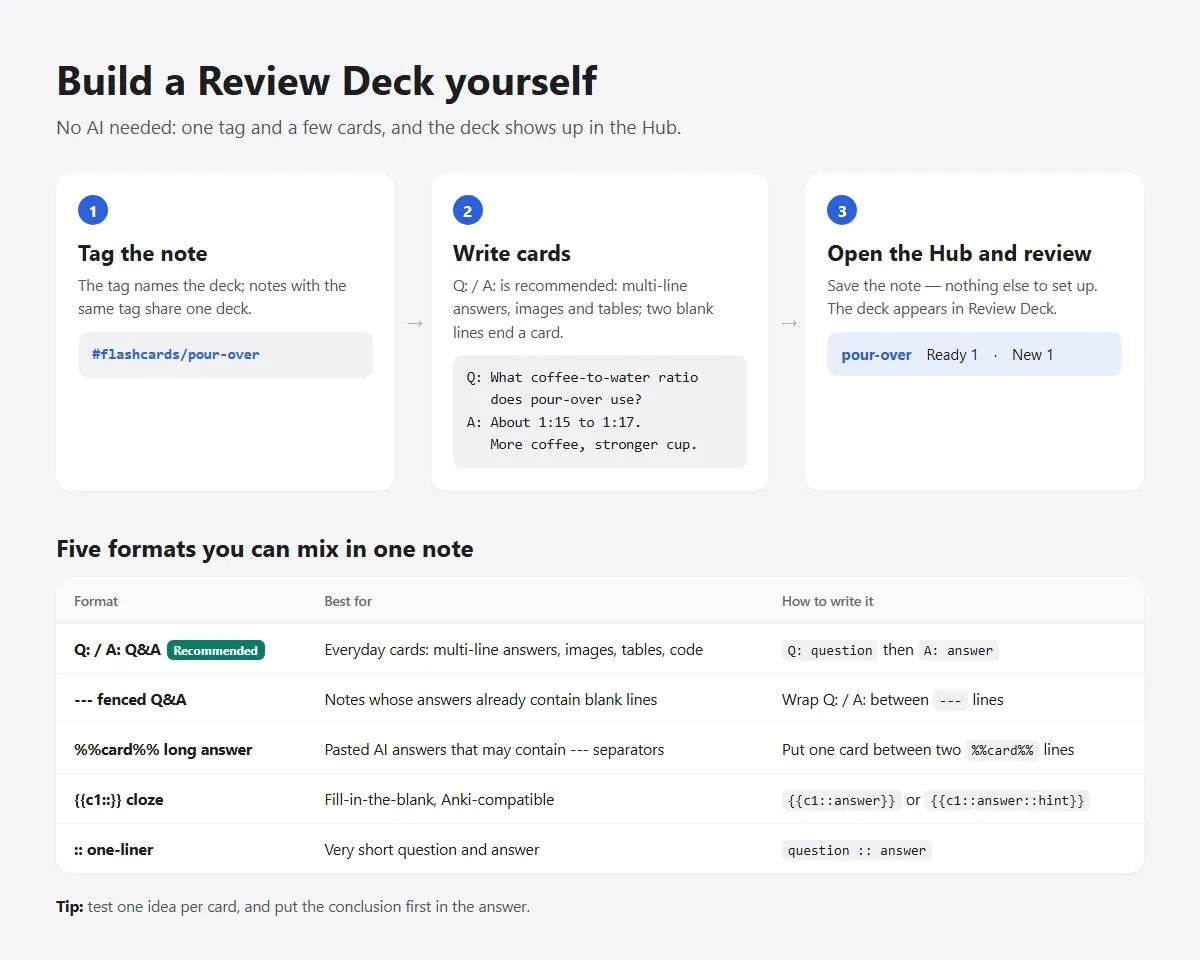
Tag a note #flashcards/topic and write cards in any of five formats, mixable in one note: Q:/A: for multi-line answers with images, tables or code; --- fenced Q&A; %%card%% for long pasted answers; {{c1::}} cloze; and :: one-liners. The five flashcard formats guide has copyable examples.[13]
When you are stuck, L1 shows only the question, L2 gives a contextual anchor from your own vault that rebuilds where you first met the idea, and L3 gives a narrowing hint that never states the answer.[13] The review-deck skill writes the hints, and you can edit them during review.
To build decks with AI, install the skills once in Settings, EngramQuest, AI Skills, then ask the AI tool you already use: Claude Code, Claude Desktop, Codex, Antigravity, Gemini CLI or Cursor. The generation runs in that tool, so there is no API key to paste and no per-token fee. AI-made cards are saved in engram-review/ai-cards/ and never touch your source notes.[13]
Prompt for your AI tool
Build a review deck from my notes tagged math.Scheduling data is JSON in engram-review/sr/, and fixing a card during review writes the change back to your source note. From the same notes, EngramQuest can also make courses, teaching videos, practice quests and memory maps, all optional; see Review Deck.[13]
Limits. Reversed cards, image occlusion and shared decks are not documented, there is no Anki import, there are no user-facing FSRS settings, and there is no whole-note review. AI generation happens in an AI tool on your computer; reviewing works on Obsidian mobile too.[13]
Best for people who want everything inside the vault, with FSRS, hints that keep them recalling, and decks made by the AI tool they already pay for.
How do you choose an Obsidian flashcard plugin?
Start from where you review and how you want cards made. This decision list covers the common cases.
- You already use Anki, especially on your phone: use an Anki-sync plugin (Obsidian_to_Anki or Flashcards) and keep Anki as the scheduler.
- You want the simplest proven reviewer and no AI: Spaced Repetition.
- You write study notes as headings and tables, want FSRS tuning, or want to bring an Anki deck over with its history: Decks.
- You need multiple choice, image occlusion or hotspot cards, or AI with your own API key: LearnKit.
- You want quick OpenAI generation and a small FSRS reviewer on desktop: Spaced Repetition AI.
- You want everything inside the vault with FSRS, step-by-step hints and AI-made decks from Claude Code, Codex, Gemini CLI or Cursor, without an API key: EngramQuest.
- You want to learn in Obsidian but keep some cards in Anki: write those cards in the :: or {{c1::}} format, review them in EngramQuest, and send them to Anki with Obsidian_to_Anki.[13]
If you already review in Anki, sync your Obsidian cards to it. If you want to review inside Obsidian, choose an FSRS plugin by where it stores review data and how it helps you make cards.
How do you write flashcards that actually stick?
Write one small idea per card, make yourself recall it before you look, and let the scheduler space the reviews. These habits matter more than which plugin you pick.
Recalling is itself a learning event. In Roediger and Karpicke's experiments, students who practiced recalling a passage remembered more of it a week later than students who reread it, even though rereading looked better on a test five minutes after study.[16] Spacing helps too: Cepeda and colleagues' quantitative review found that spreading practice out beats massing it, and that the best gap between sessions grows with how long you need to remember.[17] In Dunlosky and colleagues' review of ten study techniques, practice testing and distributed practice were the two rated high utility.[18]
Good flashcards test one idea, make you recall before you see the answer, and come back at growing intervals. Retrieval practice plus spacing is the best-supported study combination in learning research.[16][17][18]
Rules for each card
- One idea per card. Piotr Wozniak, who created SuperMemo, calls this the minimum information principle: simple items are easier to remember and to schedule. Split a list or a paragraph into several cards.[19]
- Understand before you memorize. His first two rules are not to learn what you do not understand, and to learn before you memorize.[19]
- Avoid sets and enumerations. Ask for one member or one step at a time, or give each item its own cloze.[19]
- Use cloze for facts inside context. A {{c1::cloze}} keeps the sentence around the answer as a cue.[19]
- Write or rewrite cards yourself. People remember words they generate better than words they only read, the generation effect, so treat AI-made cards as a first draft and edit the ones that matter.[20]
- Try before you take a hint, and always check the answer. In cue studies, recall with fewer cues was more effortful and failed more often, and feedback after each attempt reduced that cost.[21]
On scheduling, FSRS grew out of research that modeled memory from large sets of review logs and optimized when each item should come back.[15] Anki now offers it in deck options, and so do most of the plugins above.[14]
How did we check these plugins?
On 19 November 2026 we read each plugin's README, its manifest.json (for the version and the desktop-only flag) and the documentation pages the README points to, and we counted entries in Obsidian's official community-plugins.json.[1] We did not run timed benchmarks, and we report no download or star counts. Where a project's documentation disagreed with its README or changelog, we used the newer source and said so.
Versions in each manifest on that date: Spaced Repetition 1.15.4, Obsidian_to_Anki 3.6.0, Flashcards 2.2.0, Decks 2.12.9, LearnKit 1.8.6, Spaced Repetition AI 1.0.1 and EngramQuest 2.0.6. If something here is out of date, tell us on GitHub.
Frequently asked questions
What's the best flashcard plugin for Obsidian?
It depends on where you review. Spaced Repetition is the simple, long-standing default, an Anki-sync plugin such as Obsidian_to_Anki suits people who already use Anki, and Decks, LearnKit or EngramQuest add FSRS with more card types, tuning, hints or AI help.
Which Obsidian plugins use FSRS?
As of November 2026: Spaced Repetition (since version 1.14.2, alongside SM-2-OSR), Decks and LearnKit (FSRS-6), Spaced Repetition AI, and EngramQuest (FSRS-5). Anki-sync plugins use whatever scheduler you set in Anki, which includes FSRS.
Can I use Anki and Obsidian together?
Yes. Write cards in your notes and push them to Anki with Obsidian_to_Anki or Flashcards; both need Anki desktop and the AnkiConnect add-on. Anki then handles scheduling, and you review in Anki's own apps.
Which Obsidian flashcard plugins work on my phone?
Spaced Repetition, Decks, LearnKit and EngramQuest run on Obsidian mobile. Spaced Repetition AI, Obsidian_to_Anki and Flashcards are desktop-only, though with the Anki-sync plugins you review on Anki's phone apps.
Can AI make flashcards from my Obsidian notes?
Yes. LearnKit and Decks use your own API key, Spaced Repetition AI uses OpenAI with your key, and EngramQuest's skills run in the AI tool you already use, such as Claude Code or Codex, with no API key. AI is optional in all of them, and editing AI-made cards yourself helps you remember them.
Can I run two flashcard plugins in one vault?
You can, but test it on a copy first. Several plugins read the same :: syntax, so both may pick up the same cards; giving each plugin its own tag or folder avoids that.
Sources
Every research claim in this article links to one of these sources. Preprints are marked as such.
- Obsidian (2026). obsidian-releases: community-plugins.json (the official community plugin list). GitHub, obsidianmd/obsidian-releases. Checked 19 November 2026. github.com/obsidianmd/obsidian-releases
- Mwangi, S., & Klus, K. (2026). Obsidian Spaced Repetition Plugin: README and manifest.json (v1.15.4). GitHub, st3v3nmw/obsidian-spaced-repetition. Checked 19 November 2026. github.com/st3v3nmw/obsidian-spaced-repetition
- Mwangi, S., & Klus, K. (2026). Obsidian Spaced Repetition Plugin: changelog (1.14.2, 13 May 2026: "add FSRS scheduling for flashcards"). GitHub. Checked 19 November 2026. github.com/st3v3nmw/obsidian-spaced-repetition/blob/master/docs/docs/changelog.md
- Mwangi, S. (2026). Obsidian Spaced Repetition documentation: Data storage. Checked 19 November 2026. stephenmwangi.com/obsidian-spaced-repetition/data-storage/
- Pseudonium (2026). Obsidian_to_Anki: README and manifest.json (v3.6.0). GitHub, Pseudonium/Obsidian_to_Anki. Checked 19 November 2026. github.com/Pseudonium/Obsidian_to_Anki
- Pseudonium (2026). Obsidian_to_Anki wiki: Note formatting, Inline notes, Cloze formatting, Regex. GitHub. Checked 19 November 2026. github.com/Pseudonium/Obsidian_to_Anki/wiki
- Colucci, A. (2026). Flashcards (flashcards-obsidian) v2: README and manifest.json (v2.2.0). GitHub, reuseman/flashcards-obsidian. Checked 19 November 2026. github.com/reuseman/flashcards-obsidian
- Lika, X. (2026). Decks (DecksMD): README and manifest.json (v2.12.9). GitHub, dscherdi/decks (AGPL-3.0). Checked 19 November 2026. github.com/dscherdi/decks
- Guy, W. (2026). LearnKit: README, FAQ and manifest.json (v1.8.6). GitHub, ctrlaltwill/LearnKit (MIT). Checked 19 November 2026. github.com/ctrlaltwill/LearnKit
- Guy, W. (2026). LearnKit documentation: Creating Flashcards. Checked 19 November 2026. ctrlaltwill.github.io/LearnKit/Creating-Flashcards/
- Guy, W. (2026). LearnKit documentation: Syncing (sync privileges, where progress lives) and Scheduling (FSRS, optimisation). GitHub, ctrlaltwill/LearnKit, site/src/content/docs. Checked 19 November 2026. github.com/ctrlaltwill/LearnKit/blob/main/site/src/content/docs/Syncing.md
- Mo, B., & Leong, A. (2026). Spaced Repetition AI (SRAI): README, manifest.json (v1.0.1) and default settings. GitHub, ai-learning-tools/obsidian-spaced-repetition-ai (MIT). Checked 19 November 2026. github.com/ai-learning-tools/obsidian-spaced-repetition-ai
- EngramQuest (2026). EngramQuest: README (v2.0.6). GitHub, bahfahh/engram-quest. Checked 19 November 2026. github.com/bahfahh/engram-quest
- Anki (2026). Anki Manual: Deck Options (FSRS). Checked 19 November 2026. docs.ankiweb.net/deck-options.html
- Ye, J., Su, J., & Cao, Y. (2022). A stochastic shortest path algorithm for optimizing spaced repetition scheduling. Proceedings of the 28th ACM SIGKDD Conference on Knowledge Discovery and Data Mining (KDD '22), 4381–4390. doi.org/10.1145/3534678.3539081
- Roediger, H. L., & Karpicke, J. D. (2006). Test-enhanced learning: Taking memory tests improves long-term retention. Psychological Science, 17(3), 249–255. doi.org/10.1111/j.1467-9280.2006.01693.x
- Cepeda, N. J., Pashler, H., Vul, E., Wixted, J. T., & Rohrer, D. (2006). Distributed practice in verbal recall tasks: A review and quantitative synthesis. Psychological Bulletin, 132(3), 354–380. doi.org/10.1037/0033-2909.132.3.354
- Dunlosky, J., Rawson, K. A., Marsh, E. J., Nathan, M. J., & Willingham, D. T. (2013). Improving students' learning with effective learning techniques: Promising directions from cognitive and educational psychology. Psychological Science in the Public Interest, 14(1), 4–58. doi.org/10.1177/1529100612453266
- Wozniak, P. A. (1999). Effective learning: Twenty rules of formulating knowledge. SuperMemo. www.supermemo.com/en/archives1990-2015/articles/20rules
- Slamecka, N. J., & Graf, P. (1978). The generation effect: Delineation of a phenomenon. Journal of Experimental Psychology: Human Learning and Memory, 4(6), 592–604. doi.org/10.1037/0278-7393.4.6.592
- Finley, J. R., Benjamin, A. S., Hays, M. J., Bjork, R. A., & Kornell, N. (2011). Benefits of accumulating versus diminishing cues in recall. Journal of Memory and Language, 64(4), 289–298. doi.org/10.1016/j.jml.2011.01.006
About this article
powen is the creator and developer of EngramQuest, a free Obsidian plugin that turns notes into lessons, teaching videos, practice quests and FSRS flashcards. Articles here are researched and drafted with AI help; every study cited is checked against the original paper, and plugin details come from the plugin's own documentation and source code.
How EngramQuest uses memory science