
Comparison
The best Obsidian AI plugins in 2026, grouped by the job you need done
Key takeaways
- There is no single best Obsidian AI plugin: Copilot and Claudian lead for chatting with your vault, Smart Connections for finding related notes, and EngramQuest for learning and remembering what your notes contain.[1]
- The most useful question is where the AI runs: a cloud API with your key, a local model, an agent you already pay for such as Claude Code, or an AI tool outside Obsidian that writes files the plugin reads.
- Several strong options need no API key at all: Smart Connections and Similar Notes ship local embedding models, and Copilot, Claudian and Agent Client can use your existing Claude Code or Codex login.[5][6][2]
- For studying, AI helps most when it builds material you then recall and review on a schedule, because testing yourself and spacing reviews both improve long-term memory.[17][18]
A fair, checked roundup of 13 Obsidian plugins for chatting with your vault, finding related notes, writing, running local models and learning what is in your notes. Every fact comes from the plugin's own README or the official community plugin list. Last checked: 19 November 2026.
What are the best AI plugins for Obsidian in 2026?
The best Obsidian AI plugin depends on the job. For chatting with your vault, start with Copilot, Claudian or Agent Client. For finding related notes, use Smart Connections. For writing help, Smart Composer or Text Generator. For fully local AI, Local GPT. For learning and remembering what is in your notes, EngramQuest, alongside proven flashcard plugins such as Spaced Repetition and LearnKit.
We grouped plugins by job because the categories overlap less than the names suggest. A chat plugin is not a search plugin, and neither is built to help you remember what you read. Most people end up with one plugin from two or three groups.
Pick an Obsidian AI plugin by job and by where its AI runs, not by popularity: chat, semantic search, writing, local models and learning are different tools that work well side by side.
Quick picks: which Obsidian AI plugin is best for what?
If you only read one list, read this one. Each line names the plugin we would try first for that need.
- Best all-round vault assistant: Copilot for Obsidian, which runs agents such as Claude Code, Codex and OpenCode inside your vault.[2]
- Best for running Claude Code or Codex in a sidebar: Claudian.[3]
- Best for any agent that speaks the Agent Client Protocol: Agent Client.[4]
- Best for related notes with zero setup: Smart Connections, with a built-in local model and no API key.[5]
- Best lightweight related-notes panel: Similar Notes.[6]
- Best for search, topic graph and agent in one: Smart Second Brain.[7]
- Best for writing with chosen notes as context: Smart Composer.[9]
- Best for template-driven text generation: Text Generator.[8]
- Best for chatting inside a Markdown note: ChatGPT MD.[10]
- Best for private, local-model actions: Local GPT with Ollama.[11]
- Best for learning and remembering your notes: EngramQuest (our plugin): courses, teaching videos, practice quests and FSRS flashcards built by the AI tool you already use.[13]
- Best classic flashcards without AI: Spaced Repetition.[14]
- Best all-in-one study kit with an optional AI companion: LearnKit.[15]
How do the main Obsidian AI plugins compare?
The table compares what each developer states in their own README. "Cost as stated" repeats the developer's words; we list no prices because plans change.
| Plugin | Best for | AI runs where | Needs an API key? | Cost as stated | Link |
|---|---|---|---|---|---|
| Copilot for Obsidian | Vault assistant and agents | Your agent login (Claude Code, Codex), your provider key, a local model, or Copilot-hosted models | No, if you connect Claude Code, Codex or a local model | Open-source plugin, free with your own account, key or local model; paid plans for hosted models[2] | GitHub |
| Claudian | Claude Code, Codex and other agents in a sidebar | The agent CLI you install; desktop only | No separate key; the agent needs its own subscription or API provider | Free, MIT licence[3] | GitHub |
| Agent Client | Any ACP agent next to your notes | Claude Code, Codex, Gemini CLI and other ACP agents; desktop only | No separate key; uses the agent's own login | Free, Apache-2.0 licence[4] | GitHub |
| Smart Connections | Related notes and semantic lookup | Built-in local embedding model on your device | No | Free core, source available; Pro plugins for supporters[5] | GitHub |
| Similar Notes | Related notes under each note | Built-in local model on desktop; Ollama or an OpenAI-compatible API optional | No on desktop; mobile starts with an API provider | Free, MIT licence[6] | GitHub |
| Smart Second Brain | Search, topic graph and an agent | Search and graph on device; agent through Ollama, OpenAI, Anthropic and more | Only for the agent, and not with Ollama | Free and open source, MIT[7] | GitHub |
| Smart Composer | Writing with chosen notes as context | Your API provider, Ollama or LM Studio, or a connected account | Not with Ollama, LM Studio or account connect | Free, MIT licence; not under active development[9] | GitHub |
| Text Generator | Templates and text generation | Cloud providers you configure, such as OpenAI, Google Gemini and Hugging Face | Yes | Free and open source, MIT[8] | GitHub |
| ChatGPT MD | Chat inside a Markdown note | OpenAI, Anthropic or OpenRouter, or local Ollama and LM Studio | Yes, unless you run a local model | Free, MIT licence[10] | GitHub |
| Local GPT | Private text actions | Ollama or OpenAI-like endpoints, set up in the AI Providers plugin | No for local models | Free, MIT licence[11] | GitHub |
| EngramQuest (ours) | Learning and remembering your notes | The AI tool you already use (Claude Code, Claude Desktop, Codex, Gemini CLI, Cursor); review runs in Obsidian | No | Free to install and use[13] | GitHub |
| Spaced Repetition | Flashcards and note review | No AI; FSRS or SM-2 scheduling | No | Free, MIT licence[14] | GitHub |
| LearnKit | Flashcards, tests and study analytics | Optional AI Companion with your own key (Google, OpenRouter, Anthropic, OpenAI, Perplexity) | Only for Companion | Free and open source, MIT[15] | GitHub |
Three of these plugins have outside recognition worth knowing. In Obsidian's 2024 Gems of the Year, Copilot won the language model integration category, Smart Connections was a runner-up in the same category, and Spaced Repetition was a runner-up among existing plugins.[16]
Where does the AI actually run in an Obsidian plugin?
Every plugin in this roundup runs its AI in one of four places, and that choice decides cost, privacy and setup more than any feature list. Most roundups skip this, so here is the framework we used to sort the table above.
- A cloud API with your key. The plugin sends your prompt and chosen notes to OpenAI, Anthropic, Google or a router, and you pay that provider per use. Text Generator, ChatGPT MD and LearnKit's Companion work this way.[8][10][15]
- A local model on your machine. Embeddings or a chat model run on your device, often through Ollama. Smart Connections and Similar Notes ship a small local model; Local GPT talks to Ollama.[5][6][11]
- An agent you already pay for. The plugin starts Claude Code, Codex or another agent and uses its login, so a subscription you already have covers the work. Copilot, Claudian and Agent Client do this.[2][3][4]
- An AI tool outside Obsidian that writes files. The AI works on your vault from its own app, and the plugin only reads the result. EngramQuest works this way: Claude Code, Codex, Gemini CLI or Cursor build courses, quests and cards as files, and Obsidian shows them.[13]
Obsidian AI plugins run their AI in one of four places: a cloud API with your key, a local model, an agent subscription you already have, or an outside AI tool that writes files into the vault. That choice decides cost and privacy more than features do.
No route is best for everyone. Cloud APIs give the strongest models with the least setup. Local models keep notes on your machine but depend on your hardware. Agent logins avoid a second bill. File-based tools keep everything as plain files you own, at the cost of switching between two windows.
Which plugins let you chat with your Obsidian vault?
Copilot, Claudian and Agent Client are the strongest ways to chat with your vault in late 2026. All three can hand the work to coding agents such as Claude Code and Codex, which read and edit notes directly.
Copilot for Obsidian
Copilot describes itself as agents for your Obsidian vault. Version 4 runs OpenCode, Claude Code or Codex inside Obsidian, with Projects, shared skills, saved commands and a Quick Ask for selected text. You can use hosted models with a Copilot licence, your own provider key, a local model, or your existing Claude Code or Codex login.[2]
Who it is for: anyone who wants one polished assistant for research and writing across the vault. Limits: the Agent mode is desktop only, because it runs local processes; Quick Chat and commands still work on mobile. Hosted models and cloud features need a paid plan, and your prompts go to whichever provider you choose.[2]
Claudian
Claudian embeds coding agents such as Claude Code, Codex, OpenCode and others in a sidebar, with your vault as the agent's working folder. It adds inline edits with a word-level diff, projects, slash commands and skills, and @-mentions for files.[3]
Who it is for: people who already use Claude Code or Codex and want it beside their notes. Limits: desktop only, and you need at least one agent installed plus a subscription or API provider. The agent can read, write and run commands in your vault, so review what it does.[3]
Agent Client
Agent Client connects Obsidian to any agent that supports the Agent Client Protocol, with presets for Claude Code, Codex, Gemini CLI and others. You mention notes with @, see edits as diffs, and approve each action in a permission prompt.[4]
Who it is for: people who switch between several agents or run them side by side. Limits: desktop only. Its README is direct that agents keep the same system access they have in a terminal, so leave auto-allow off unless you understand the risk.[4]
Which Obsidian plugins find related notes and search by meaning?
Smart Connections is the default choice for semantic search and related notes, because it works right after install with a local model and no API key. Similar Notes and Smart Second Brain are good alternatives with different strengths.
Smart Connections
Smart Connections indexes your vault with a built-in local embedding model and shows notes related to the one you are writing. A Lookup view searches the vault by meaning, and you can drag a result into a note to link it. The README states it is private and offline by default and works on mobile.[5]
Who it is for: writers and researchers with hundreds or thousands of notes. Limits: chat moved out to a separate Smart Chat plugin, and the README says API-based model integrations now live in Smart Chat Pro. Inline connections, ranking options and Bases integration are Pro features. The code is source available under the Smart Plugins License rather than a standard open-source licence.[5]
Similar Notes
Similar Notes shows related notes at the bottom of the current note and adds a search-by-meaning shortcut. On desktop a built-in model downloads once and runs locally; you can also use Ollama or an OpenAI-compatible API.[6]
Limits: on mobile, new installs start with a cloud provider because built-in models can crash phones with little memory. The index lives on each device and does not sync.[6]
Smart Second Brain
Smart Second Brain combines keyword-plus-meaning search, a Smart Graph that groups notes into topics, and an agent that reads and writes notes. Search and the graph work with no AI provider; the agent runs on Ollama, OpenAI, Anthropic and others. It is free, open source and runs on desktop and mobile.[7]
Which Obsidian AI plugins help with writing?
For writing inside a note, Smart Composer, Text Generator and ChatGPT MD are the established options. They differ in how you give the AI context and in how actively each is maintained.
Smart Composer
Smart Composer lets you pick exact notes or folders as context with @, suggests edits you apply in one click, and can search the vault for relevant notes. It supports many API providers, local models through Ollama and LM Studio, and MCP servers.[9]
Limits: its README carries a maintenance notice: it is maintained by one developer and is not under active development, with community forks listed in its discussions. The developer also warns about the risks of connecting a Claude subscription instead of using an API key.[9]
Text Generator
Text Generator generates ideas, titles, summaries, outlines and paragraphs from your notes, driven by templates you write or install from the community. Providers such as OpenAI, Google Gemini and Hugging Face are set per note in frontmatter. It is free and open source.[8]
Limits: you need a key for a cloud provider. The official plugin list shows its last release in April 2026, so check the release history before relying on new model support.[1][8]
ChatGPT MD
ChatGPT MD turns any note into a chat. You link other notes with wiki links to give context, define personas as agent notes, and can allow it to search your vault with tool calls you approve. It works with OpenAI, Anthropic and OpenRouter keys, or with local models in Ollama and LM Studio.[10]
Which Obsidian AI plugins work with local models or offline?
Local GPT is built for local models first, and several others can use Ollama or ship their own local model. If your notes must stay on your machine, these are the options to check.
Local GPT
Local GPT adds AI actions to a context menu and an action palette: continue writing, summarise, fix spelling, find action items or run your own prompts, with images and RAG over links and backlinks. You set up Ollama or any OpenAI-like provider in the companion AI Providers plugin.[11][12]
Limits: you install and run the models yourself, so speed and quality depend on the model your computer can run.
Other plugins with a local option
- Smart Connections: built-in local embeddings, no key.[5]
- Similar Notes: built-in local model on desktop, or Ollama.[6]
- Smart Second Brain, Smart Composer, ChatGPT MD: Ollama support.[7][9][10]
- Copilot: a local model through its own-key settings.[2]
EngramQuest is different again. The AI step happens in your own AI tool, but reviewing cards happens inside Obsidian on your device. The README lists the few things the plugin uses the network for, such as downloading the video skills when you install them, and states that it never sends note content.[13]
What is the best Obsidian AI plugin for learning and remembering your notes?
For learning what is already in your notes, EngramQuest is our pick, with Spaced Repetition and LearnKit as strong flashcard-first alternatives. This group answers a different question from chat and search: not "what do my notes say?" but "will I still know it next month?"
That question has good evidence behind it. Testing yourself improves long-term retention more than rereading,[17] and spreading reviews out beats cramming them together.[18] An AI plugin helps your memory when it creates material you then recall and review on a schedule, not when it answers for you. See the science behind it.
AI helps you remember your notes when it builds material you then recall and review on a schedule. Retrieval practice and spaced review are two of the best-supported findings in memory research.
EngramQuest (our plugin)
EngramQuest turns notes into AI-built courses, short animated teaching videos, practice quests and FSRS flashcards. The generating is done by the AI tool you already use (Claude Code, Claude Desktop, Codex, Antigravity, Gemini CLI or Cursor) through installable skills, so there is no API key and no extra subscription. AI stays optional: tag a note #flashcards/topic, write a Q: and A: card, and it appears in your Review Deck.[13]
- Lessons: a goal-first course of interactive lessons, each ending with a quiz. Lessons
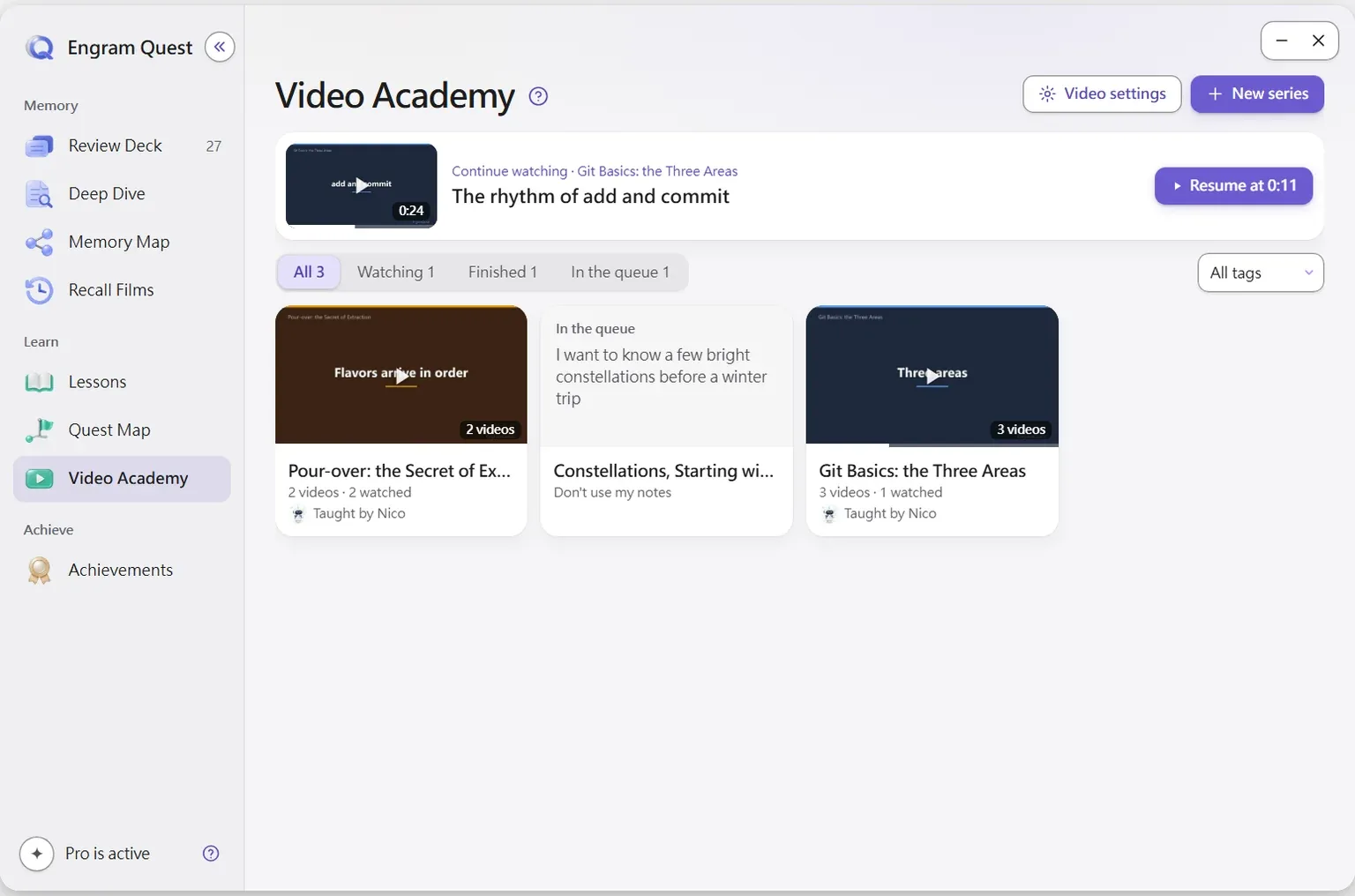
- Video Academy: short animated lessons made with Claude Code, with your place saved. Video Academy
- Quest Map: practice missions in Easy, Medium and Hard, ending with a Boss Battle. Quest Map
- Review Deck: FSRS-5 scheduling, hints in three steps that never give away the answer, five card formats, and edits that write back to your note. Review Deck
Prompts you can say to your AI tool after installing the skills
Turn Note.md into a quest-map medium
Build a review deck from notes tagged mathWho it is for: students and lifelong learners who want to understand and keep what they read, not just store it. Limits: it does not chat with your vault or search by meaning, so pair it with Copilot, Claudian or Smart Connections for that. The AI path needs one of the supported AI tools, and teaching videos are made with Claude Code specifically. A few extras, such as more video teachers and making new recall films, are an optional upgrade inside the plugin. It has no shared deck library.[13]
Spaced Repetition
The long-standing flashcard plugin. Write cards in your notes with double-colon, question-mark or cloze syntax, organise decks by tag or folder, and review flashcards or whole notes on an FSRS or SM-2 schedule. It has no AI, so you write cards yourself or ask any AI tool to write them in its syntax.[14] We compare it with EngramQuest in EngramQuest vs Obsidian Spaced Repetition.
LearnKit
LearnKit is a study system with FSRS scheduling, many card types including image occlusion, note review, tests, study analytics and Anki import and export. Its optional Companion generates flashcards and tests and answers questions using your own API key. It is free, open source and works on mobile.[15]
Limits: Companion needs a key from a supported provider, and the README notes that not every model supports every feature.[15]
How do you choose the right Obsidian AI plugin?
Answer five questions and the shortlist usually picks itself.
- What job do you need done? Ask questions, find connections, draft text, or learn and remember. Pick one plugin per job instead of one plugin for everything.
- Do you already pay for an AI tool? If you have Claude Code, Codex or Gemini CLI, choose plugins that use that login (Copilot, Claudian, Agent Client) or that work through it (EngramQuest), and avoid a second bill.
- Must your notes stay on your machine? Prefer Smart Connections, Similar Notes or Local GPT with Ollama, and read each plugin's privacy section.
- Do you work on a phone? Agent-based chat plugins are desktop only. Smart Connections, Smart Second Brain, LearnKit and EngramQuest's review run on mobile.
- Is the plugin maintained? Check the last release date and any notice in the README before you build a workflow on it.
A common setup in late 2026 is one chat or agent plugin, one related-notes plugin and one learning plugin. They do not conflict, because each one does a different job.
How we checked this list
We read each plugin's README and licence on GitHub and its entry in Obsidian's official community plugin list on 19 November 2026.[1] We repeat cost as each developer states it and give no prices. We left out download and star counts because they change daily and say little about fit. We also left out plugins whose last release was more than a year ago.
What is new here compared with most "best plugins" lists: the four-way "where the AI runs" framework, a table that pairs each plugin with its API-key needs and cost in the developer's own words, and an explicit maintenance check. If something is out of date, tell us on GitHub and we will fix it.
Frequently asked questions
What AI plugins for Obsidian do you recommend?
Copilot or Claudian for chatting with your vault, Smart Connections for finding related notes, Smart Composer or Text Generator for writing, Local GPT for local models, and EngramQuest for learning and remembering your notes. Most people combine one plugin from two or three of these groups.
Is there a free AI plugin for Obsidian?
Yes. Smart Connections, Similar Notes, Claudian, Agent Client, Local GPT, ChatGPT MD, Text Generator and LearnKit are free plugins, and EngramQuest is free to install and use. You may still pay your AI provider if you use a cloud API or an agent subscription.
Which Obsidian AI plugin works without an API key?
Smart Connections and Similar Notes run a built-in local model with no key. Copilot, Claudian and Agent Client can use your existing Claude Code or Codex login. EngramQuest uses the AI tool you already have, so it needs no API key either.
Can I use Claude Code or Codex inside Obsidian?
Yes. Claudian, Agent Client and Copilot all run Claude Code and Codex from inside Obsidian on desktop. EngramQuest takes the other route: Claude Code works on your vault and the plugin shows the courses, videos and cards it makes.
What is the best Obsidian AI plugin for studying and flashcards?
EngramQuest if you want AI-built courses, teaching videos, practice quests and FSRS flashcards from your notes without an API key. Spaced Repetition for simple flashcards without AI, and LearnKit for a full study kit with an optional AI companion that uses your own key.
Can I run several Obsidian AI plugins at the same time?
Yes. A chat plugin, a related-notes plugin and a learning plugin do different jobs and work side by side. Avoid two plugins that index the whole vault for the same purpose, since both will spend time and storage on it.
Sources
Every research claim in this article links to one of these sources. Preprints are marked as such.
- Obsidian (2026). obsidian-releases: community-plugins.json and community-plugin-stats.json (the official community plugin list and its release data). GitHub, obsidianmd/obsidian-releases. Checked 19 November 2026. github.com/obsidianmd/obsidian-releases
- Yang, L., & Brevilabs (2026). Copilot for Obsidian: README and plan disclosure. GitHub, logancyang/obsidian-copilot (AGPL-3.0). Checked 19 November 2026. github.com/logancyang/obsidian-copilot
- Tu, Y. (2026). Claudian: README. GitHub, YishenTu/claudian (MIT). Checked 19 November 2026. github.com/YishenTu/claudian
- RAIT-09 (2026). Agent Client Plugin for Obsidian: README. GitHub, RAIT-09/obsidian-agent-client (Apache-2.0). Checked 19 November 2026. github.com/RAIT-09/obsidian-agent-client
- Petro, B. (2026). Smart Connections v4: README. GitHub, brianpetro/obsidian-smart-connections (Smart Plugins License, source available). Checked 19 November 2026. github.com/brianpetro/obsidian-smart-connections
- joybro (2026). Similar Notes for Obsidian: README. GitHub, joybro/obsidian-similar-notes (MIT). Checked 19 November 2026. github.com/joybro/obsidian-similar-notes
- S2B Devs (2026). Smart Second Brain: README. GitHub, s2b-dev/smart-second-brain (MIT). Checked 19 November 2026. github.com/s2b-dev/smart-second-brain
- Haouari, N. (2026). Text Generator (obsidian-textgenerator-plugin): README. GitHub, nhaouari/obsidian-textgenerator-plugin (MIT). Checked 19 November 2026. github.com/nhaouari/obsidian-textgenerator-plugin
- Suh, H. (2026). Smart Composer: README, including its maintenance notice. GitHub, glowingjade/obsidian-smart-composer (MIT). Checked 19 November 2026. github.com/glowingjade/obsidian-smart-composer
- Adams, B. (2026). ChatGPT MD: README. GitHub, bramses/chatgpt-md (MIT). Checked 19 November 2026. github.com/bramses/chatgpt-md
- Frankov, P. (2026). Local GPT plugin for Obsidian: README. GitHub, pfrankov/obsidian-local-gpt (MIT). Checked 19 November 2026. github.com/pfrankov/obsidian-local-gpt
- Frankov, P. (2026). Obsidian AI Providers: README. GitHub, pfrankov/obsidian-ai-providers. Checked 19 November 2026. github.com/pfrankov/obsidian-ai-providers
- EngramQuest (2026). EngramQuest: README (v2.0.x). GitHub, bahfahh/engram-quest. Checked 19 November 2026. github.com/bahfahh/engram-quest
- Mwangi, S. (2026). Obsidian Spaced Repetition Plugin: README. GitHub, st3v3nmw/obsidian-spaced-repetition (MIT). Checked 19 November 2026. github.com/st3v3nmw/obsidian-spaced-repetition
- Guy, W. (2026). LearnKit: README and FAQ. GitHub, ctrlaltwill/LearnKit (MIT). Checked 19 November 2026. github.com/ctrlaltwill/LearnKit
- Obsidian (2025). 2024 Gems of the Year winners. Obsidian blog. obsidian.md/blog/2024-goty-winners/
- Roediger, H. L., & Karpicke, J. D. (2006). Test-enhanced learning: Taking memory tests improves long-term retention. Psychological Science, 17(3), 249–255. doi.org/10.1111/j.1467-9280.2006.01693.x
- Cepeda, N. J., Pashler, H., Vul, E., Wixted, J. T., & Rohrer, D. (2006). Distributed practice in verbal recall tasks: A review and quantitative synthesis. Psychological Bulletin, 132(3), 354–380. doi.org/10.1037/0033-2909.132.3.354
About this article
powen is the creator and developer of EngramQuest, a free Obsidian plugin that turns notes into lessons, teaching videos, practice quests and FSRS flashcards. Articles here are researched and drafted with AI help; every study cited is checked against the original paper, and plugin details come from the plugin's own documentation and source code.
How EngramQuest uses memory science