
Obsidian workflows
How to use Claude Code with Obsidian: setup, safety and the plugins that help
Key takeaways
- Claude Code works on an Obsidian vault without any plugin: start it in the vault folder and it edits the Markdown files directly, and Obsidian picks up the changes.[1]
- There are three ways to connect Claude to Obsidian: run Claude Code in the vault folder, open an agent panel inside Obsidian (Claudian, Agent Client), or bridge into the running app over MCP (Local REST API with MCP).[11][12][9]
- Vault rules belong in CLAUDE.md, which Claude Code reads at the start of every session; Anthropic recommends keeping each file under 200 lines.[2]
- Put the vault in git before an agent edits it: Claude Code's /rewind does not track files changed only by shell commands, and Anthropic says checkpoints are not a replacement for version control.[4]
- EngramQuest installs skills into .claude/skills so Claude Code can turn notes into courses, flashcards, quests, memory maps and teaching videos; the skills write to their own folders and never edit your source notes.[17]
Claude Code can read, search and edit an Obsidian vault because a vault is just a folder of Markdown files.[1] This guide covers the three ways to connect the two, a CLAUDE.md written for notes rather than code, how to keep every edit reversible, and which plugins are worth adding.
Can Claude Code work with an Obsidian vault?
Yes. An Obsidian vault is a folder of Markdown-formatted plain text files on your own disk, and Obsidian refreshes automatically when another program changes them.[1] Claude Code is built to read, search and edit files in a folder, so it works on a vault with no plugin at all.
In a vault it is good at five kinds of work:
- Finding and summarising: search hundreds of notes for a topic and report what you wrote, with file names.
- Restructuring: split a long note, merge duplicates, add headings or properties to a batch of notes.
- Linking: suggest [[wikilinks]] between related notes, or draft a map-of-content note that lists them.
- Study material: questions, flashcards and outlines drawn from notes you already wrote.
- Maintenance: find broken links, empty notes, or notes missing a tag.
Two limits are worth knowing early. Claude Code sees files, not the Obsidian app: it does not know which note you have open, and features that live inside Obsidian (commands, the graph, rendered queries) are invisible to it unless you add a bridge. And it edits real files, so a careless instruction changes real notes. The rest of this guide deals with both.
What are the ways to connect Claude Code and Obsidian?
There are three, and they differ in where Claude runs and what it can reach. The grouping is ours; the facts in each row come from the linked projects.
| Approach | How it works | What Claude can reach | Needs |
|---|---|---|---|
| 1. Claude Code in the vault folder | Open a terminal in the vault and run claude, or run it inside Obsidian with the Terminal plugin's integrated terminal[13] | Every file in the folder, plus shell commands | Claude Code installed and signed in |
| 2. An agent panel inside Obsidian | Claudian embeds Claude Code and other agents with the vault as working directory; Agent Client chats with Claude Code, Codex, Gemini CLI and other ACP agents[11][12] | Vault files, plus notes you @-mention; Agent Client auto-mentions the active note | Desktop Obsidian; the agent installed and signed in |
| 3. A bridge into the running app | Local REST API with MCP runs an MCP server inside Obsidian; mcp-obsidian is a separate MCP server built on the same REST API[9][10] | Notes, search, tags, the active file and Obsidian commands, through the app | Obsidian running; the plugin's API key; an MCP entry in your client |
Claude Desktop has no terminal, so it reaches a vault through MCP. One route is a filesystem server such as the official @modelcontextprotocol/server-filesystem, which may touch only the directories you list.[16] The other is the Local REST API bridge; its README says to connect Claude Desktop through mcp-remote, because Claude Desktop does not natively support remote HTTP MCP servers.[9]
Obsidian 1.12 also added an official command line. Turn on Settings → General → Command line interface, and commands such as obsidian search query="..." or obsidian backlinks file=<name> work from any terminal, so Claude Code can ask Obsidian for backlinks and tags instead of parsing files itself. The app has to be running; the first command starts it if it is not.[6]
You do not need a plugin to use Claude Code with Obsidian: start Claude Code in the vault folder and it edits the Markdown files directly. Plugins add convenience (a chat panel inside Obsidian) or reach (Obsidian's own commands through MCP).[1][9]
How do you set up Claude Code for an Obsidian vault?
Start Claude Code from the vault's root folder, give it a CLAUDE.md with your vault rules, and put repeatable procedures in skills. Five steps:
- Back up first. Make the vault a git repository (or install the Git plugin, below) and commit once, so every later change can be compared and undone.
- Start in the vault root. Change to the folder that contains .obsidian and run claude. Claude Code loads project skills from .claude/skills/ in the folder where you start it and the folders above it, up to the repository root;[3] started outside the vault, it will not see the vault's skills.
- Write CLAUDE.md. Claude Code reads CLAUDE.md at the start of every session. Put it in the vault root or in .claude/CLAUDE.md, or run /init to draft one. If you already keep an AGENTS.md for other AI tools, Claude Code reads it when there is no CLAUDE.md, or you can import it from CLAUDE.md with a line that says @AGENTS.md.[2]
- Add skills for repeated jobs. A skill is a folder .claude/skills/<name>/ containing a SKILL.md whose description tells Claude when to use it. Claude loads it when a request matches, or when you type /<name>.[3]
- Start cautious. Press Shift+Tab until the status bar shows plan mode. Claude then reads and proposes changes, and edits stay blocked until you approve the plan.[5]
A CLAUDE.md written for notes, not code
Most CLAUDE.md examples are for software projects. A vault needs different rules: where new notes go, how links look, and what never to touch. Here is a starting point. Keep it short: Anthropic suggests under 200 lines per CLAUDE.md, because longer files use more context and are followed less reliably.[2]
CLAUDE.md in the vault root (a starting point)
# Vault rules

This folder is an Obsidian vault. Notes are Markdown files.

## Writing notes
- Link related notes with [[wikilinks]], not Markdown links.
- New notes go in Inbox/ unless I name a folder.
- Reuse the properties already in use (tags, source, created). Do not invent new ones.
- Match my style: short sentences, headings no deeper than ###.

## Never
- Never rename, move or delete an existing note unless I name that exact file.
- Never edit anything inside .obsidian/.
- Never write API keys, tokens or passwords into a note.

## Before a bulk change
- List every file you will touch and wait for my OK.The rename rule matters more in a vault than in code. Obsidian can update internal links automatically when you rename a file in the app.[8] A rename done by another program on disk is not guaranteed to go through that feature, so links to the old name can break. If you want Claude to reorganise notes, ask it for a list of moves and make them in Obsidian, or use a bridge that works inside the app.
How do you stop Claude Code from damaging your notes?
Make every change reversible before it happens: keep the vault in git, leave Obsidian's File recovery on, and review bulk edits in plan mode. Claude Code's own undo helps, but it does not cover everything.
| Safety net | What it covers | What it misses |
|---|---|---|
| Git (command line, or the Git plugin) | Every file and every committed change, with diffs and history; the plugin adds scheduled commit-and-sync and source control, history and diff views inside Obsidian[14] | Work you have not committed yet. The README calls its mobile support highly unstable.[14] |
| Claude Code checkpoints (/rewind, or Esc twice) | Edits Claude made with its own file tools in the session[4] | Files changed only by shell commands, most subagent edits, and changes made outside Claude Code[4] |
| Obsidian File recovery (core plugin) | Snapshots of your notes, by default at least 5 minutes apart and kept for 7 days[7] | It is not a full backup, and snapshots stay on the device that took them[7] |
| Plan mode and permission prompts | Claude proposes first; you approve before it edits[5] | Only as good as your review of the plan |
Before letting Claude Code edit an Obsidian vault, commit the vault to git. Claude Code's /rewind only restores edits made with its own file tools, and Anthropic's documentation says checkpoints are not a replacement for version control.[4]
Two more habits help. Keep secrets out of notes, because a synced vault copies them to every device and every remote. And when you try a new bulk prompt, run it on one folder first, read the diff, then widen it. If you use the Local REST API bridge, note that it refuses to read or write anything inside Obsidian's .obsidian configuration folder, for REST and MCP alike.[9]
Which Obsidian plugins work well with Claude Code?
The useful plugins do one of four jobs: give Claude a place to run inside Obsidian, bridge it into the app, keep its changes safe, or turn its output into something you use. Every row below was checked against the project's own README, and every plugin except mcp-obsidian (an MCP server, not a plugin) is in Obsidian's community plugin list.[19]
| Plugin | Job | What it does with Claude Code | Good to know |
|---|---|---|---|
| Claudian | Agent panel | Embeds Claude Code (and Codex, OpenCode and other agents) in the vault: file read and write, search, bash, skills, slash commands, @-mentions and MCP servers[11] | Desktop only; Obsidian 1.13.0 or later; needs a compatible subscription or API provider[11] |
| Agent Client | Agent panel | Chat with Claude Code, Codex, Gemini CLI or any Agent Client Protocol agent; note edits appear as word-level diffs and each action can need your approval[12] | Uses the MCP servers and skills your agent already has; nothing to configure in the plugin[12] |
| Terminal | Run the CLI | Integrated terminals inside Obsidian, so you can run claude without switching windows[13] | Installing Python is optional but recommended on Windows[13] |
| Local REST API with MCP | Bridge | A built-in MCP server: read, create, patch and search notes, read the active file, list tags and run Obsidian commands[9] | Add it to Claude Code with claude mcp add --transport http and your API key[9] |
| mcp-obsidian | Bridge | A separate MCP server with tools such as search, get_file_contents and patch_content, working through Local REST API[10] | Python 3.11 or later; run with uvx; Local REST API must be running[10] |
| Git | Safety | Automatic commit-and-sync on a schedule, plus source control, history and diff views[14] | Desktop is the reliable target; mobile is described as highly unstable[14] |
| Excalidraw | Diagrams | A native CLI for coding agents and a portable agent skill, so a local agent can create, inspect, edit and render drawings[15] | The agent CLI needs Obsidian 1.12.2 or later with the CLI turned on[15] |
| EngramQuest (this site's plugin) | Learning | Installs skills into .claude/skills/ so Claude Code builds courses, flashcards, quests, memory maps and teaching videos that open in Obsidian[17] | Free to install and use; AI is optional; the plugin itself never calls an AI[17] |
Agent panels and bridges overlap with what Claude Code already does in a terminal. Add one if you want to stay inside Obsidian, or if you use Claude Desktop. For a wider list of AI plugins grouped by job (chat, search, writing, local models), see Best Obsidian AI plugins.
What can you ask Claude Code to do in a vault?
Requests work best when they name the folder, the output and the limit ("do not edit", "show me first"). These are examples of the kind we use; change the folder names to yours.
General vault prompts (examples)
Read every note in Projects/Thesis/ and list the claims I make more than once, with file names. Do not edit anything.

Find notes in Reading/ that have no outgoing [[links]]. For each one, suggest up to three existing notes it should link to. Show me the list before changing anything.

Create Topics/Statistics MOC.md: a map-of-content note that links every note tagged #statistics, grouped by subtopic, one line per link on how it fits.

Read Biology/Cell membrane.md and write five questions I should be able to answer from memory. Put them in a new note next to it. Do not answer them.If you install EngramQuest's skills, these are the sentences the plugin itself suggests in its guide. Swap the topic or note name for yours:[17]
EngramQuest prompts (from the plugin's in-app guide)
I want to learn SEO, build me a course
Make a Review Deck from my notes on photography
Turn my calculus notes into a Quest Map
Create a Memory Map for operating-systems.md
Make teaching videos about building a websiteThe plugin's README adds one way to steer how cards are made: mark key answers in your notes with ==highlight== or bold, then add a rule to CLAUDE.md.[17]
CLAUDE.md rule from the EngramQuest README
IMPORTANT: When building a Review Deck, every highlighted ==text== must become a review card.How do you turn notes into courses and flashcards with Claude Code?
Install skills that tell Claude Code what to build and where to save it, then ask in one sentence. That is what EngramQuest does. EngramQuest is made by powen, who also runs this site, so weigh this section with that in mind.
- Install EngramQuest from Community Plugins, then open Settings → EngramQuest → AI Skills and press Install for Claude Code. The skills land in .claude/skills/ as folders such as engram-quest-review-deck, and update when the plugin updates (you can turn that off).[17]
- Start Claude Code in the vault and say what you want, for example Turn Note.md into a quest-map medium or Build a review deck from notes tagged math.[17]
- Open the Hub from the EngramQuest icon in the left ribbon. The course, deck, quest or map is on its page, ready to use.
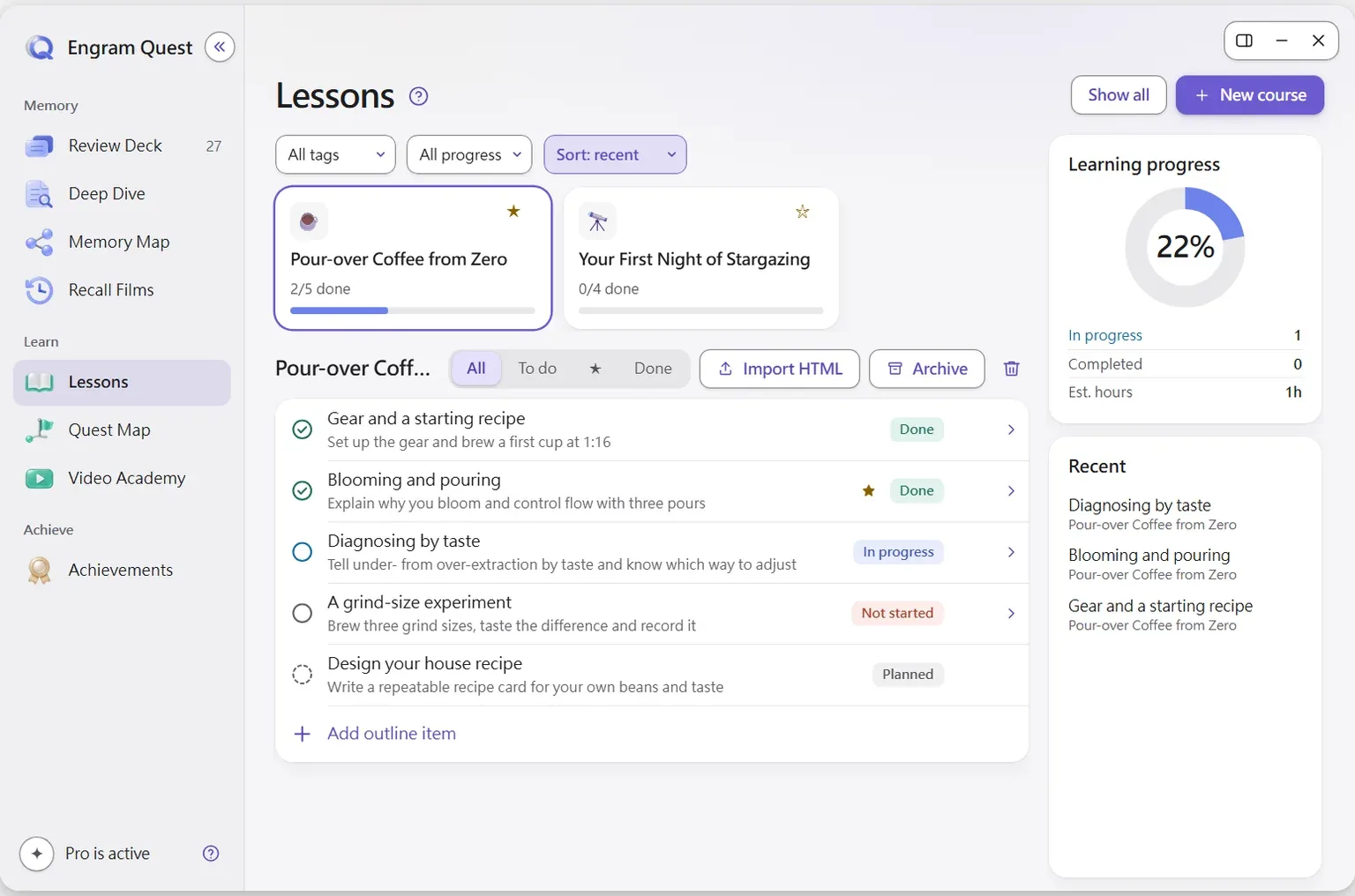
AI output goes into its own folders, such as engram-review/ai-cards/ for cards and engram-quest/lessons/ and engram-quest/quests/ for courses and quests, and the skills never edit your source notes.[17] The plugin itself never calls an AI: Claude Code does the generating on the plan you already have, with no extra subscription or API fee.[17] Teaching videos are the one Claude Code-only feature. They are rendered on your computer by the animated-course skill, which downloads from the project's GitHub Releases when you press Install.[17]
AI stays optional. Tag a note #flashcards/topic, write Q: and A: cards yourself, and they appear in Review Deck with no AI involved.[17] The supported AI tools, the skill folder for each, and the Claude Desktop setup prompt are on the Claude Code page; the three first steps are in the guide; and a full walk-through from a learning goal to review is in How to learn with AI in Obsidian.
Does letting Claude Code do the work hurt your learning?
It can, when Claude produces the answers you were meant to work out. In a field experiment with nearly a thousand high school maths students, unrestricted GPT-4 access raised practice grades by 48%. When access was taken away, those students scored 17% lower than students who never had it. A tutor version with guardrails largely avoided that harm.[18] It is one study in one subject, but the direction is clear.
For a vault the lesson is practical. Use Claude Code to organise notes and to build practice: questions, cards, missions. Then do the recalling yourself. A summary Claude writes is Claude's thinking; a question you answer from memory is yours. Our six-step method for this, with or without AI, is in How to study with Obsidian, and Best Obsidian flashcard plugins compares the tools that schedule the review.
Use Claude Code to build practice, not to replace it: in a PNAS field experiment, students with unrestricted GPT-4 access scored 17% lower once access was removed than students who never had it.[18]
Frequently asked questions
Do I need a plugin to use Claude Code with Obsidian?
No. An Obsidian vault is a folder of Markdown files, so Claude Code can work on it directly when you start it in the vault folder. Plugins such as Claudian, Agent Client or Local REST API with MCP add a chat panel inside Obsidian or a bridge into the running app.
Can Claude Desktop edit my Obsidian notes?
Yes, through MCP. Connect a filesystem MCP server limited to your vault folder, or the Local REST API with MCP plugin through mcp-remote; EngramQuest's in-plugin guide also has a one-time setup prompt for Claude Desktop.
Where should CLAUDE.md go in an Obsidian vault?
In the vault's root folder (or .claude/CLAUDE.md), and start Claude Code from that folder. Claude Code reads it at the start of every session, so keep it to rules that always apply.
Can Claude Code break my Obsidian links?
It can if it renames or moves notes on disk, because Obsidian's automatic link updating is tied to renames made in the app. Add a rule against renaming or moving notes to CLAUDE.md and keep the vault in git.
Does Claude Code work with Obsidian on a phone?
Not directly: Claude Code and the agent panels run on desktop, and Claudian says it is desktop only. What Claude builds on your computer reaches your phone when the vault syncs.
What does EngramQuest add to Claude Code?
Skills that teach Claude Code to build courses, Review Deck flashcards with FSRS scheduling, Quest Map practice missions, Memory Maps and teaching videos, which open in the EngramQuest Hub inside Obsidian. It is free to install and use, and AI is optional.
Sources
Every research claim in this article links to one of these sources. Preprints are marked as such.
- Obsidian (2026). How Obsidian stores data. Obsidian Help. Checked 19 November 2026. obsidian.md/help/data-storage
- Anthropic (2026). How Claude remembers your project (CLAUDE.md, AGENTS.md and imports). Claude Code documentation. Checked 19 November 2026. code.claude.com/docs/en/memory
- Anthropic (2026). Extend Claude with skills. Claude Code documentation. Checked 19 November 2026. code.claude.com/docs/en/skills
- Anthropic (2026). Checkpointing. Claude Code documentation. Checked 19 November 2026. code.claude.com/docs/en/checkpointing
- Anthropic (2026). Permission modes (plan mode). Claude Code documentation. Checked 19 November 2026. code.claude.com/docs/en/permission-modes
- Obsidian (2026). Obsidian CLI. Obsidian Help. Checked 19 November 2026. obsidian.md/help/cli
- Obsidian (2026). File recovery (core plugin). Obsidian Help. Checked 19 November 2026. obsidian.md/help/plugins/file-recovery
- Obsidian (2026). Internal links. Obsidian Help. Checked 19 November 2026. obsidian.md/help/links
- Coddington, A. (2026). Local REST API with MCP: README. GitHub, coddingtonbear/obsidian-local-rest-api. Checked 19 November 2026. github.com/coddingtonbear/obsidian-local-rest-api
- Pfundstein, M. (2026). MCP server for Obsidian (mcp-obsidian): README. GitHub, MarkusPfundstein/mcp-obsidian. Checked 19 November 2026. github.com/MarkusPfundstein/mcp-obsidian
- Tu, Y. (2026). Claudian: README. GitHub, YishenTu/claudian. Checked 19 November 2026. github.com/YishenTu/claudian
- RAIT-09 (2026). Agent Client Plugin for Obsidian: README. GitHub, RAIT-09/obsidian-agent-client. Checked 19 November 2026. github.com/RAIT-09/obsidian-agent-client
- polyipseity (2026). Terminal for Obsidian: README. GitHub, polyipseity/obsidian-terminal. Checked 19 November 2026. github.com/polyipseity/obsidian-terminal
- Vinzent03 (2026). Git Plugin for Obsidian: README. GitHub, Vinzent03/obsidian-git. Checked 19 November 2026. github.com/Vinzent03/obsidian-git
- Zsolt Viczián (2026). Excalidraw for Obsidian: README (section "Native CLI for coding agents"). GitHub, zsviczian/obsidian-excalidraw-plugin. Checked 19 November 2026. github.com/zsviczian/obsidian-excalidraw-plugin
- Model Context Protocol (2026). Filesystem MCP Server (@modelcontextprotocol/server-filesystem): README. GitHub, modelcontextprotocol/servers. Checked 19 November 2026. github.com/modelcontextprotocol/servers/tree/main/src/filesystem
- EngramQuest (2026). EngramQuest: README (v2.0.x) and in-plugin guide. GitHub, bahfahh/engram-quest. Checked 19 November 2026. github.com/bahfahh/engram-quest
- Bastani, H., Bastani, O., Sungu, A., Ge, H., Kabakcı, Ö., & Mariman, R. (2025). Generative AI without guardrails can harm learning: Evidence from high school mathematics. Proceedings of the National Academy of Sciences, 122(26), e2422633122. doi.org/10.1073/pnas.2422633122
- Obsidian (2026). obsidian-releases: community-plugins.json (the official community plugin list). GitHub, obsidianmd/obsidian-releases. Checked 19 November 2026. github.com/obsidianmd/obsidian-releases
About this article
powen is the creator and developer of EngramQuest, a free Obsidian plugin that turns notes into lessons, teaching videos, practice quests and FSRS flashcards. Articles here are researched and drafted with AI help; every study cited is checked against the original paper, and plugin details come from the plugin's own documentation and source code.
How EngramQuest uses memory science