
Guide
How to use AI in Obsidian to learn: a complete workflow, step by step
Key takeaways
- Let AI generate the study material and keep every act of recall for yourself: in a field experiment with nearly a thousand students, those who practised with unrestricted GPT-4 scored 17% lower once it was taken away.[3]
- Recalling beats rereading over time: in Roediger and Karpicke's study, reading a passage once and recalling it three times left 61% remembered a week later, against 40% for reading it four times.[1]
- With EngramQuest, one sentence to the AI tool you already use builds each piece (a course, videos, a deck, quests or a map), and every piece is saved as files in your own vault.
- AI stays optional: a note tagged #flashcards/topic with a Q: line and an A: line is already a scheduled flashcard.
- Every step works in Claude Code, Codex, Gemini CLI, Cursor or Claude Desktop, except teaching videos and recall films, which are made with Claude Code.
Most AI help in Obsidian ends in a chat window. This guide follows one topic, pour-over coffee, from a learning goal to a course, short teaching videos, flashcards with hints, practice quests, a memory map and spaced review. You get the exact sentences to type, the files each step writes, and the one rule that keeps AI from doing your learning for you.
What should AI do when you learn, and what should you do?
AI should make the material and you should do the remembering. Building a course, a deck of good questions or a realistic practice case is slow work that AI does well. Pulling an answer out of your own memory is the step that builds the memory, and no tool can do it for you.
The clearest evidence comes from a field experiment with nearly a thousand high school maths students. Students given a standard ChatGPT-style interface to GPT-4 during practice improved their practice grades by 48%. When the access was removed, they scored 17% lower than students who never had it. A second version, a tutor with prompts designed to protect learning, raised practice grades by 127% and largely avoided that harm.[3] The authors' reading is that students used the open chatbot as a crutch: it solved the problems, so they did not.
Design changes the result. In a randomized crossover trial in an introductory physics course at Harvard (194 students in the analysis), an AI tutor built to guide students one step at a time, with expert solutions written into its prompts, produced median learning gains more than double those of an in-class active learning lesson.[4] It is one course at one university, and the authors say so, but it shows the same thing from the other side: AI helps when it is set up to make you work.
Two older findings explain why. Information you produce yourself is remembered better than information you only read (the generation effect).[5] And retrieving an answer strengthens it more than restudying it: in Roediger and Karpicke's experiment, students who read a passage four times recalled 83% after five minutes but only 40% a week later, while students who read it once and recalled it three times dropped from 71% to 61%.[1] A large review of study techniques rated practice testing and spaced practice the two most useful.[6]
The useful split is simple: AI generates, you retrieve. Any setup where the AI also answers your review questions removes the step that does the learning.[3]
Everything below is built on that split. What this guide adds to the usual lists of AI plugins is a full worked example in a real plugin, the exact sentences to type, the folder each step writes to, and a comparison of the common setups on the two questions that matter for learning.
Which ways of using AI in Obsidian actually help you learn?
The setups differ less in how clever the model is than in two things: where the result lives, and whether you still do the recall. The table compares four common ways people use AI with Obsidian to study. The first three describe general patterns, not any one plugin, and each varies with the tool you pick.
| Chat in a side panel | Copy and paste from a web chatbot | AI makes flashcards only | Skills approach (EngramQuest) | |
|---|---|---|---|---|
| Where the content lives | In the chat history, unless you save an answer to a note | In the chatbot's history; in your vault only once you paste it | Card files or a card database, depending on the tool | Files in your vault: courses, videos, quests, maps and cards, each in its own folder |
| Who does the recall | You can, but asking for the answer is one message away | Usually you read answers instead of recalling them | You do, once the cards exist | You do: the question comes first, then up to three hints, then the answer |
| Teaching before testing | Only if you ask for it | Only if you ask for it | No: cards assume you already understand | Yes: a course, short videos and practice missions come before the cards |
| Review schedule | None built in | None | Depends on the flashcard tool | FSRS-5 schedules every card |
| Review offline | Each new answer needs the model (cloud or local) | Pasted notes work offline | Usually, once the cards are made | Yes: reviews, lessons, quests and finished videos are local files |
| What leaves your device | Depends on the plugin: which provider, which notes, whose key | Whatever you paste, sent to the chatbot's provider | The notes sent to the model that writes the cards | The plugin sends no note content; your AI tool sends the notes it reads to its provider, under that tool's terms |
| What you pay for AI | Varies: your own API key, a subscription or a local model | Your chatbot plan | Varies by tool | The plan you already have for Claude Code, Codex, Gemini CLI, Cursor or Claude Desktop; no API fees from the plugin |
Each approach has a fair use. A side-panel chat is good for asking questions about your notes while you write. Copying from a chatbot is fine for a one-off explanation. A local model keeps everything on your machine. The weakness they share for learning is that nothing makes you answer before you see the answer, and nothing brings the idea back next week.
For learning, the deciding questions are where the output lives and who answers the question at review time, not which model writes it.
How do you set it up?
Install the plugin, install the skills for your AI tool once, then talk to that tool from your vault folder. Skills are instruction files that sit in your vault for your AI tool to read; the plugin itself never calls an AI.
- In Obsidian, open Community plugins, search EngramQuest and install it.
- Go to Settings → EngramQuest → AI Skills and press Install for your tool. Claude Code skills go to .claude/skills, Codex and Antigravity share .agents/skills, Gemini CLI uses .gemini/skills and Cursor uses .cursor/skills.
- Open your AI tool from the vault's folder and say what you want in one sentence.
- Click the EngramQuest icon in the left ribbon to open the Hub. What the AI built is in the matching tab.
No terminal? In Claude Desktop you paste one setup prompt instead: in the Hub, press ?, open Skills and AI tools and press Copy setup prompt. Claude Desktop first needs a way to read and write your vault, such as the official filesystem MCP. The Claude Code page lists what each tool can make.
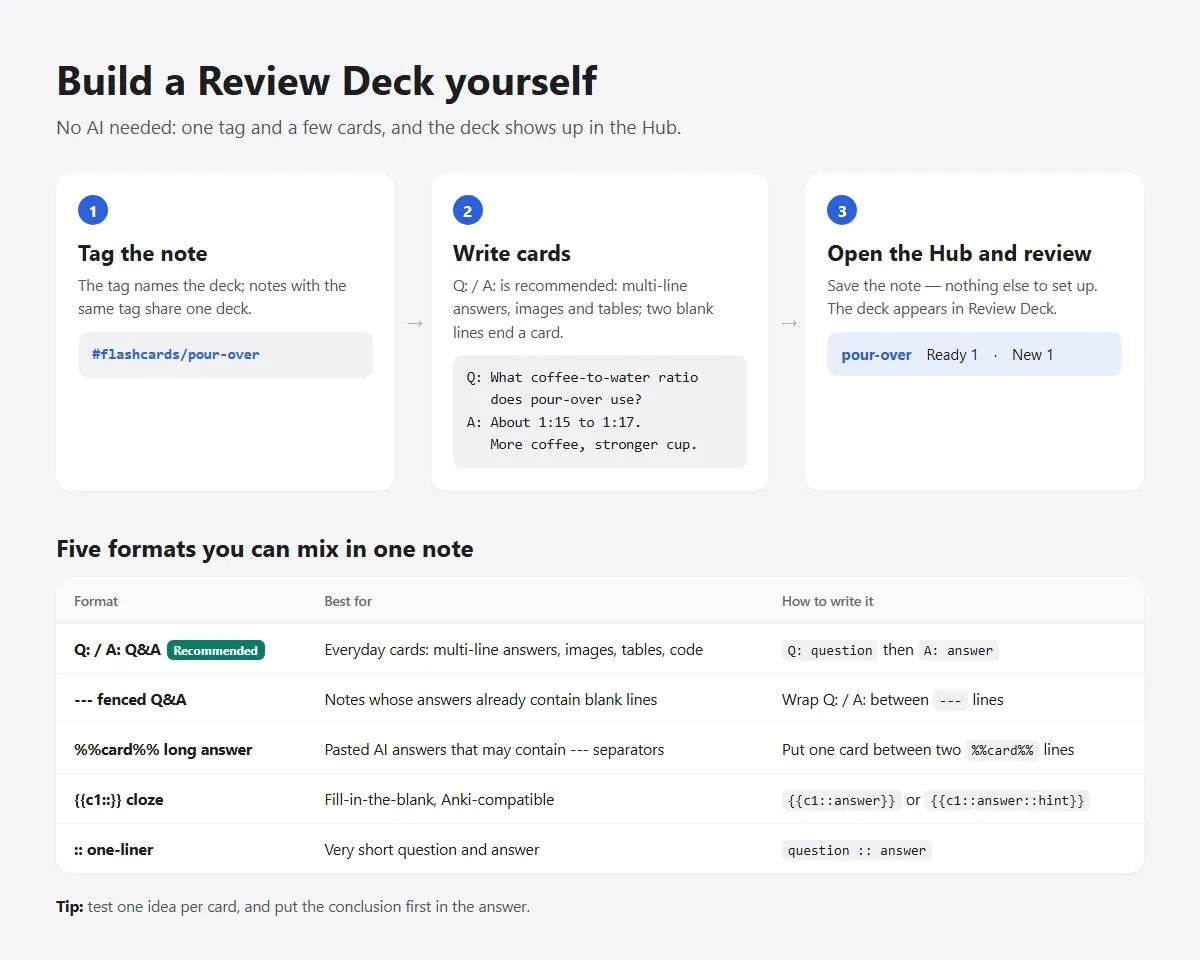
Worked example, part 1: from a goal to a course and videos
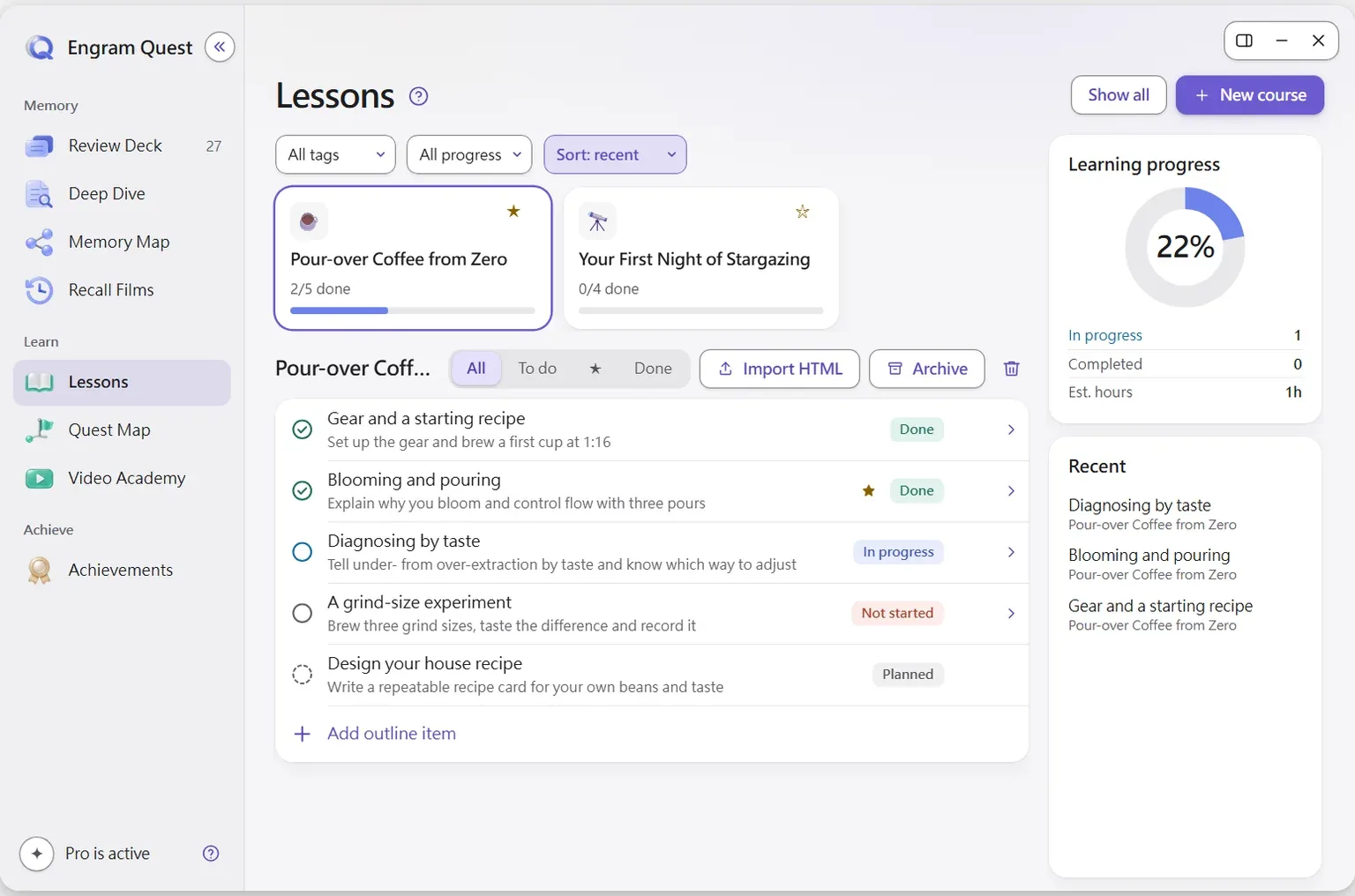
Start with a goal, not a pile of material, and let the AI turn it into a course first and short videos second. The example is pour-over coffee, the topic you see in the screenshots on this page. The sentences are the ones the plugin suggests in its own guide, with the topic swapped in.
Step 1. Write the goal in one line
Say why you are learning and where you start: “a cup I like every morning, from zero” gets a different course than “I run a café.” If you have notes on the topic, mention them; the course skill connects the course to what you already wrote.
Step 2. Ask for a course (Lessons)
Say this to your AI tool
I want to learn pour-over coffee, build me a course. I'm a complete beginner and I want a cup I like every morning.The Lesson Academy skill asks about your goal and level first, then shows the course outline for your approval before it writes any lesson. Changing an outline is cheap; regenerating lessons is not. Each lesson is an interactive HTML page you study inside Obsidian, and each ends with a quiz. For fast-moving technical topics the skill checks the web and cites its sources. The course is saved in engram-quest/lessons/<course>/: a meta.json that tracks progress, plus one HTML file per lesson.
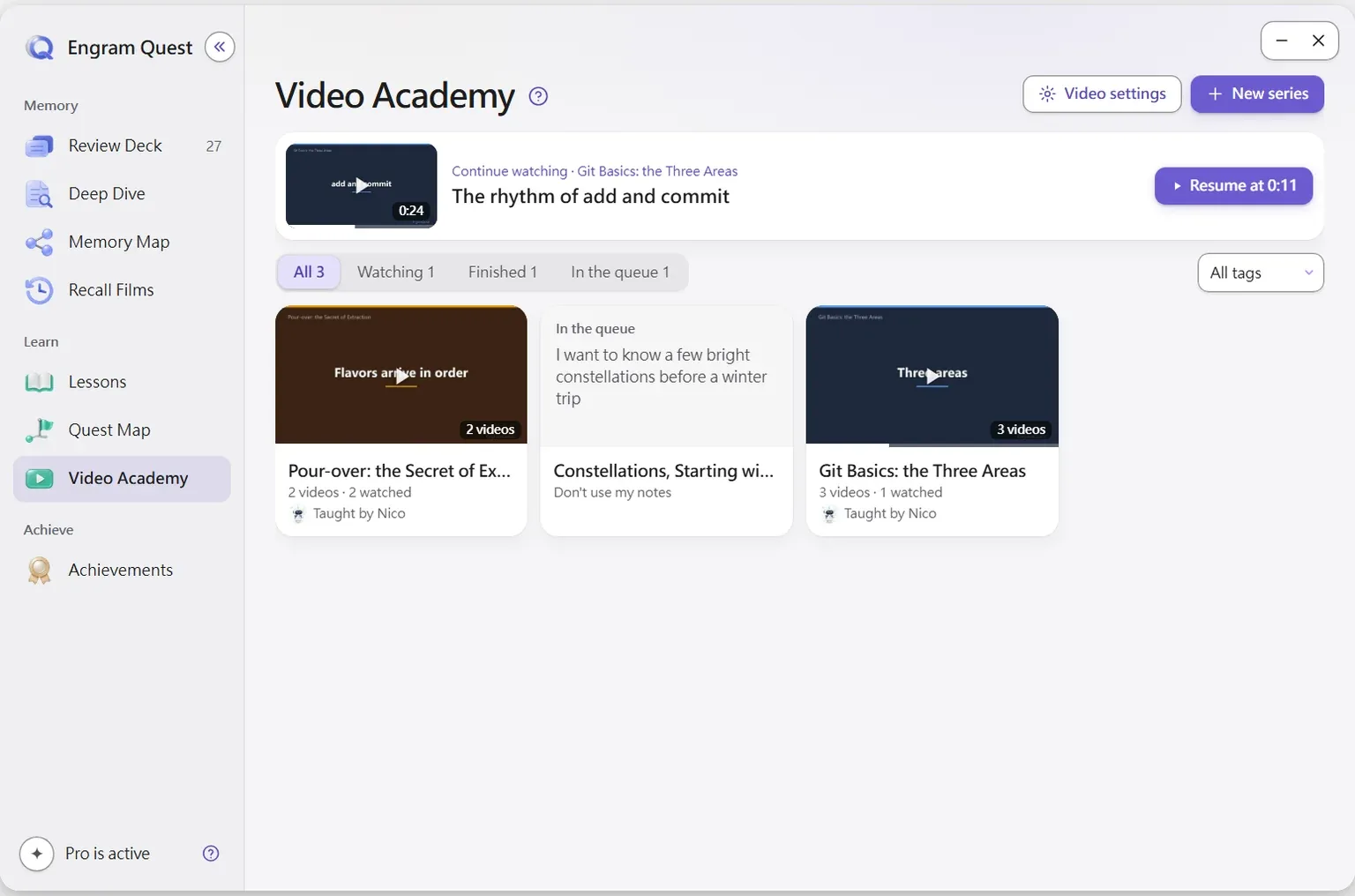
Step 3. Add short teaching videos (Video Academy)
Videos help most with mechanisms you have to see: how water moves through the grounds, why a finer grind extracts more. In the Video Academy tab press New series, write what you want to learn, and choose whether the AI picks relevant notes, uses notes you drop in, or uses none. The plugin saves the request and hands you a prompt for Claude Code:
The prompt the plugin gives you
Use the engram-quest-animated-course skill to make the Video Academy series "Pour-over: the Secret of Extraction". The request is in engram-quest/videos/<series-folder>/meta.json.You can also skip the form and tell Claude Code “Make teaching videos about pour-over extraction.” Claude Code shows the syllabus once (the lessons, what each lets you do, and the teacher if you have not set one), then makes the series to the end. Finished videos are saved in engram-quest/videos/ and appear on the shelf. Each lesson is cut into short segments, and the reason for that has good evidence behind it, covered in how Video Academy makes teaching videos.[8]
Worked example, part 2: flashcards, quests, a map and review
Once you understand the topic, turn it into things that make you retrieve, apply and connect it, then let the schedule bring it back. This is where the split from the first section matters most: from here on, you answer.
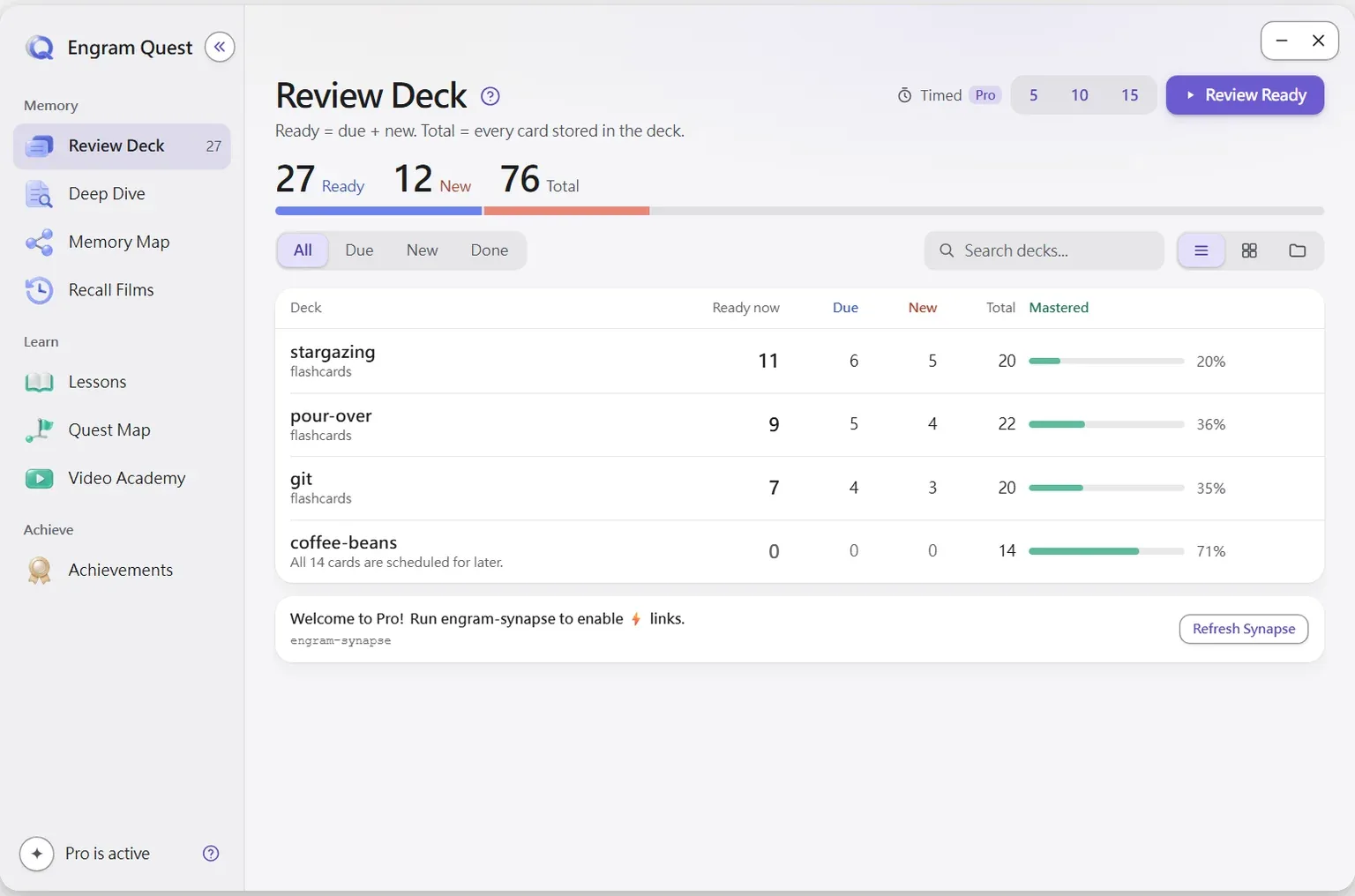
Step 4. Make flashcards with hints (Review Deck)
Say this to your AI tool
Make a Review Deck from my notes on pour-over coffeeIf you finished the course, you can ask instead for the course to be turned into Review Deck cards. The review-deck skill writes cards to engram-review/ai-cards/ and their hints to engram-review/hints/; it never edits your source notes. During review each card shows the question alone first (L1). If you are stuck, L2 rebuilds where you first met the idea, from your own vault, and L3 gives a keyword direction, never the full answer. You can edit a card mid-review, and you rate it Again, Hard, Good or Easy.
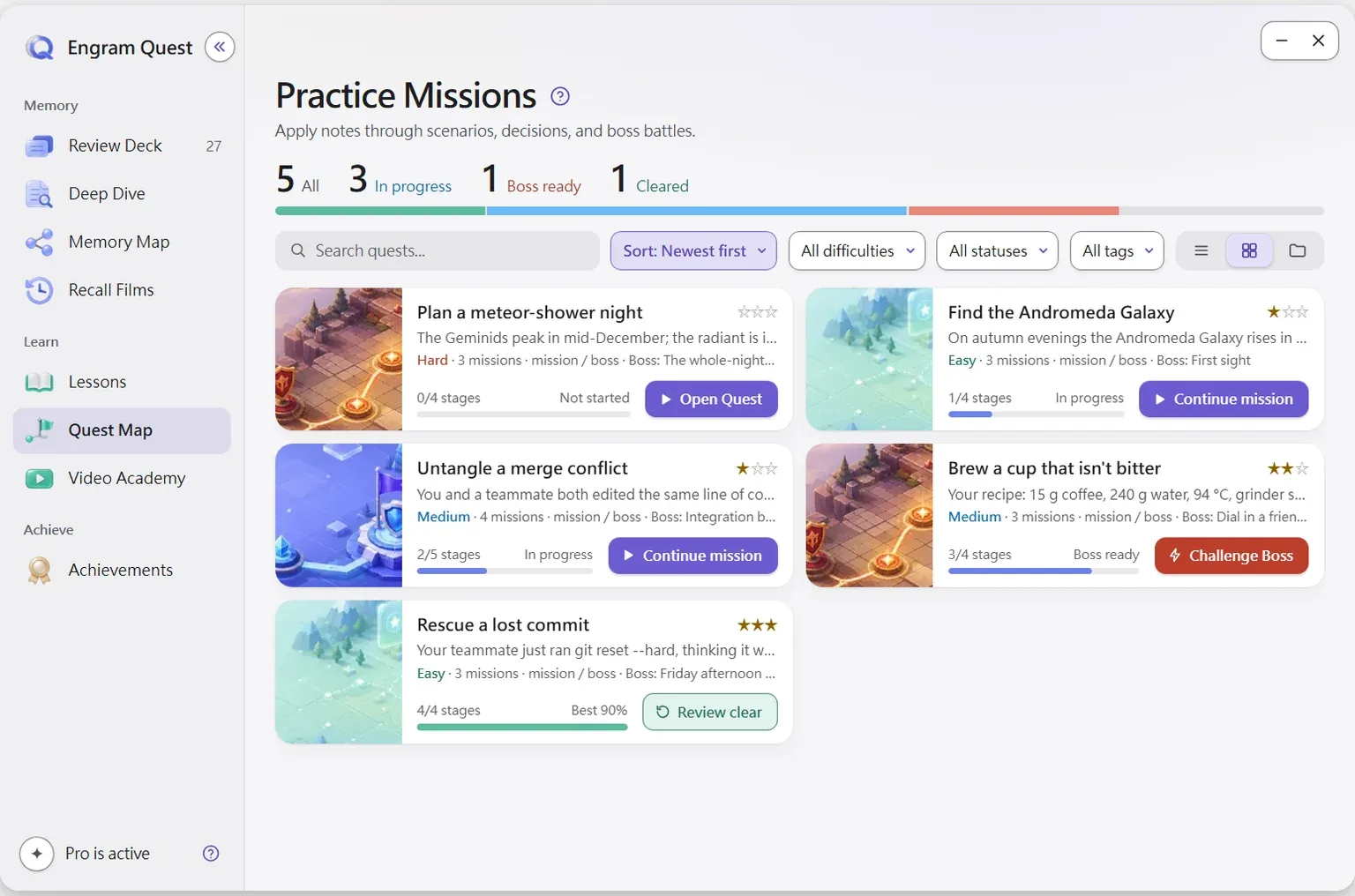
Step 5. Practise using it (Quest Map)
Say this to your AI tool
Turn my pour-over notes into a Quest Map, mediumA quest puts you in a situation you have not seen, with the real material in front of you, and asks you to do what someone with the skill would do, then scores it. Difficulty is easy, medium or hard, and a Boss Battle at the end tests judgment and trade-offs. Quests are saved in engram-quest/quests/, and your scores in engram-quest/state/, so the AI can update a quest without wiping your progress.
Step 6. See how the ideas connect (Memory Map)
Say this to your AI tool
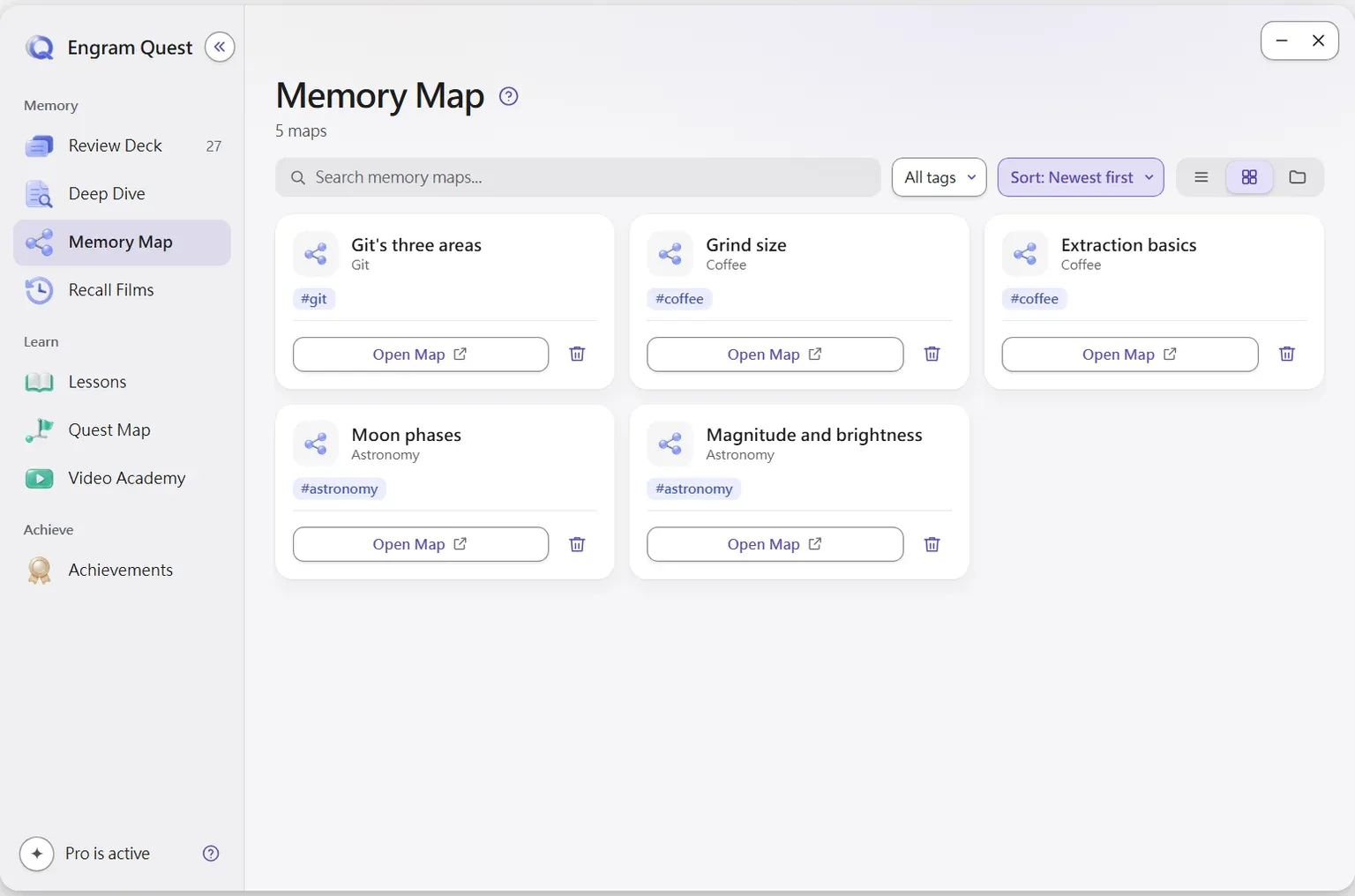
Create a Memory Map for {your extraction note}.mdThe memory-map skill draws the topic as an Obsidian Canvas using chunking, analogy and links to notes you already have. It saves {note-name}-memory.canvas next to the note, or in the Memory Map folder if you set one. Any file with that ending appears in the Memory Map tab, and during review the Memory Map button opens the map that belongs to the card.
Step 7. Review a few minutes a day (spaced review)
Open Review Deck and press Review Ready. The scheduler, FSRS-5, estimates how stable each memory is and brings the card back close to the point where you would start forgetting, so easy cards return rarely and hard ones often.[7] Spacing reviews out beats cramming the same reviews together; a review of hundreds of experiments found the benefit across many retention intervals.[2] Cards that came from a video carry a Rewatch this part button, so a failed card leads straight back to the explanation.
A workflow that ends at “the AI made me flashcards” is half done. The memory is built in the weeks after, one retrieval at a time, on a schedule.[1][2]
At the end of a month, a recall film can walk you back through what you studied, with retrieval questions per topic. Watching films is free; making new ones is part of the optional upgrade inside the plugin.
Where does each step save its files?
Every step writes plain files to a known folder in your vault, and none edits your notes, so the material syncs with whatever you use and stays readable without the plugin.
| Step | Say this | Skill | Saved in | Hub tab |
|---|---|---|---|---|
| Course | I want to learn {topic}, build me a course | lesson-academy | engram-quest/lessons/ | Lessons |
| Videos | Make teaching videos about {topic} | animated-course (Claude Code) | engram-quest/videos/ | Video Academy |
| Flashcards | Make a Review Deck from my notes on {topic} | review-deck | engram-review/ai-cards/, engram-review/hints/ | Review Deck |
| Quests | Turn my {topic} notes into a Quest Map | quest-map | engram-quest/quests/ (progress in engram-quest/state/) | Quest Map |
| Map | Create a Memory Map for {note}.md | memory-map | {note-name}-memory.canvas next to the note | Memory Map |
| Review | No AI needed | none | engram-review/sr/ (schedules, as JSON) | Review Deck |
One practical point: to watch videos on your phone, your sync tool has to include the mp4 files in engram-quest/videos/. If you sync with git, every video stays in the history, which is a trade-off worth deciding on before the first series.
How long does each step take, and what can go wrong?
The plugin's documentation does not publish generation times, and they depend on your AI tool, your plan, the topic and how much you ask for, so this guide does not guess. What you can control is where the checkpoints are: the course skill waits for you to approve the outline, and the video skill asks its questions once, before production, then runs to the end.
The honest limits:
- AI can be wrong. The course skill checks the web and cites sources for fast-moving topics, and you can fix any card mid-review. Still read with a critical eye, especially numbers.
- Generation uses your AI plan. There are no API fees from the plugin, but a long course or a video series uses your tool's normal usage.
- Your AI tool sees the notes it reads. The plugin itself sends no note content anywhere. The AI tool you run sends what it reads to its own provider, as it would for any task.
- Videos need Claude Code and your computer. The video skill's scripts render on your machine, run by Claude Code in a terminal; the plugin never runs them. Narration uses the free edge-tts by default, which is not an official Microsoft API and can stop working for a while; Gemini or Azure with your own key are the dependable options.
- Do not let the AI answer your reviews. Asking your AI tool to explain a card you keep failing is fine. Asking it for the answer at review time is the crutch from the first section.
Do you need Claude Code to learn with AI in Obsidian?
Only for teaching videos and recall films. Courses, Review Decks, Quest Maps and Memory Maps work the same in Claude Code, Codex, Antigravity, Gemini CLI, Cursor and Claude Desktop, because each tool reads the same skill instructions from your vault.
The video skills render on your computer, so they install to Claude Code only, downloaded from the project's GitHub Releases (scripts, images and audio) when you press Install. The Claude Code page has the full table of tools.
Obsidian plus Claude Code is a complete learning setup: Claude Code writes the course, the videos, the cards and the quests into your vault, and Obsidian is where you study, practise and review them.
Where should you go from here?
Pick one topic you actually need this month and run steps 2, 4 and 7 only: a course, a deck, and five minutes of review a day. Add videos, quests and a map once that loop works. Then read further:
- How to make teaching videos from your notes with AI: how Video Academy works, the teachers and settings, and the research on short videos.
- Does AI make you worse at learning?: the evidence on AI as a crutch, and when it helps.
- How to learn in the AI era: what is still worth learning by heart, and how.
- The memory science behind EngramQuest: retrieval practice, spacing and the rest, with sources.
Frequently asked questions
What is the best way to use AI in Obsidian for learning?
Let AI turn a goal or your notes into study material (a course, videos, flashcards, practice quests) and keep the recall for yourself. Material that lives as files in your vault and comes back on a spaced schedule does more for memory than answers in a chat window.
Is there an Obsidian AI plugin that makes flashcards from notes?
Yes. With EngramQuest, you tell your AI tool “Make a Review Deck from my notes on {topic}”, and its review-deck skill writes cards with three levels of hints into engram-review/ai-cards/. The plugin then schedules them with FSRS-5.
Can I use Claude Code with Obsidian to learn?
Yes. Install the EngramQuest skills for Claude Code in Settings → EngramQuest → AI Skills, open Claude Code in your vault folder and ask for a course, a deck, a quest, a memory map or teaching videos. Videos and recall films need Claude Code; the rest also work in Codex, Gemini CLI, Cursor and Claude Desktop.
Does EngramQuest send my notes anywhere?
No. The plugin reads notes on your device and sends no note content anywhere. Your AI tool reads the notes you ask it to use and sends them to its own provider under that tool's terms.
Do I have to use AI?
No. Tag any note #flashcards/topic and write a Q: line and an A: line, and the card appears in Review Deck, scheduled with FSRS-5. AI only speeds up making courses, videos, quests and maps.
Sources
Every research claim in this article links to one of these sources. Preprints are marked as such.
- Roediger, H. L., III, & Karpicke, J. D. (2006). Test-enhanced learning: Taking memory tests improves long-term retention. Psychological Science, 17(3), 249–255. doi.org/10.1111/j.1467-9280.2006.01693.x
- Cepeda, N. J., Pashler, H., Vul, E., Wixted, J. T., & Rohrer, D. (2006). Distributed practice in verbal recall tasks: A review and quantitative synthesis. Psychological Bulletin, 132(3), 354–380. doi.org/10.1037/0033-2909.132.3.354
- Bastani, H., Bastani, O., Sungu, A., Ge, H., Kabakcı, Ö., & Mariman, R. (2025). Generative AI without guardrails can harm learning: Evidence from high school mathematics. Proceedings of the National Academy of Sciences, 122(26), e2422633122. doi.org/10.1073/pnas.2422633122
- Kestin, G., Miller, K., Klales, A., Milbourne, T., & Ponti, G. (2025). AI tutoring outperforms in-class active learning: An RCT introducing a novel research-based design in an authentic educational setting. Scientific Reports, 15, 17458. doi.org/10.1038/s41598-025-97652-6
- Slamecka, N. J., & Graf, P. (1978). The generation effect: Delineation of a phenomenon. Journal of Experimental Psychology: Human Learning and Memory, 4(6), 592–604. doi.org/10.1037/0278-7393.4.6.592
- Dunlosky, J., Rawson, K. A., Marsh, E. J., Nathan, M. J., & Willingham, D. T. (2013). Improving students' learning with effective learning techniques: Promising directions from cognitive and educational psychology. Psychological Science in the Public Interest, 14(1), 4–58. doi.org/10.1177/1529100612453266
- Ye, J., Su, J., & Cao, Y. (2022). A stochastic shortest path algorithm for optimizing spaced repetition scheduling. Proceedings of the 28th ACM SIGKDD Conference on Knowledge Discovery and Data Mining (KDD '22). doi.org/10.1145/3534678.3539081
- Mayer, R. E. (2005). Principles for managing essential processing in multimedia learning: Segmenting, pretraining, and modality principles. In R. E. Mayer (Ed.), The Cambridge Handbook of Multimedia Learning (pp. 169–182). Cambridge University Press. doi.org/10.1017/CBO9780511816819.012
About this article
powen is the creator and developer of EngramQuest, a free Obsidian plugin that turns notes into lessons, teaching videos, practice quests and FSRS flashcards. Articles here are researched and drafted with AI help; every study cited is checked against the original paper, and plugin details come from the plugin's own documentation and source code.
How EngramQuest uses memory science