
Guide
How to make teaching videos from your notes with AI in Obsidian
Key takeaways
- Video Academy turns one sentence, such as “build a website”, into a series of short narrated lessons, made by Claude Code with the Animated Course skill and saved in your vault.
- In Mayer's early experiments, splitting a narrated animation into learner-paced segments and teaching the key parts first each improved transfer by a median effect near d = 1; a meta-analysis of 56 investigations later put the segmenting benefit at small to medium.[1][4]
- A polished video can make you feel you learned more without improving recall, so every lesson should leave you questions to answer yourself.[6]
- Short quizzes between video segments cut mind wandering from about 40% of probes to 19% and raised final test scores in a Harvard lecture study.[7]
- The teacher Nico is free and watching any video is free; the other teachers and making new Recall Films are part of an optional upgrade inside the plugin.
You write one sentence about what you want to learn. Claude Code turns it, and the notes it picks, into a series of short animated lessons taught by a teacher in a classroom, and you watch them inside Obsidian. This is how Video Academy works in practice, what each setting does, where the files go, and what learning research says about short videos, including the part where watching alone is not enough.
How does Obsidian make teaching videos with AI?
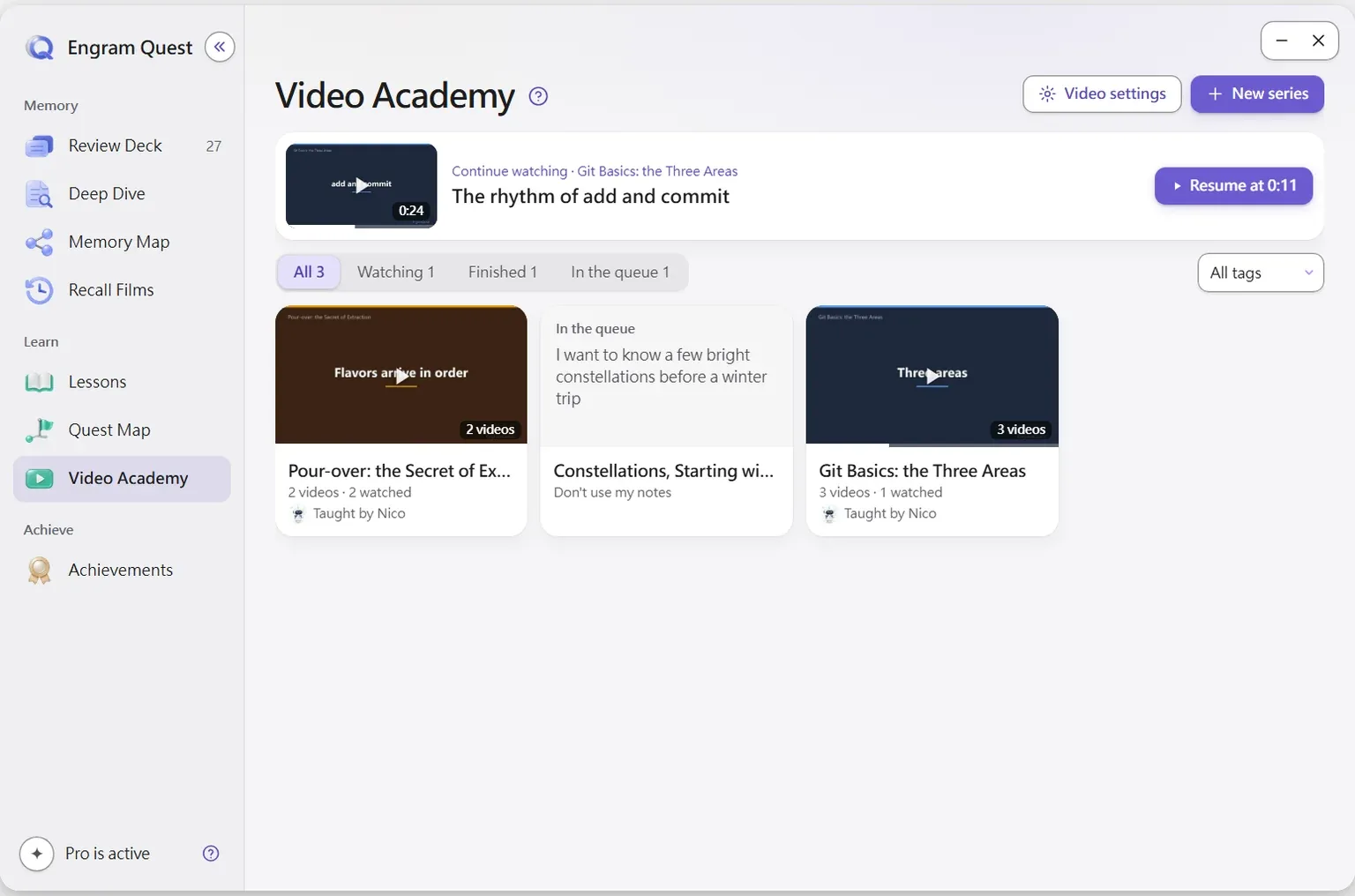
Obsidian does not render video by itself. The EngramQuest plugin adds a Video Academy tab where you say what you want to learn, and Claude Code, running the Animated Course skill, makes the videos on your computer and saves them into your vault. The plugin then plays them, remembers where you stopped and tracks what you have watched.
Each video is a short lesson, not a slideshow of your note. Every lesson opens and closes in a classroom with a blackboard, a course map and an ending mind map, and the middle is shown in whatever way makes the content clearest: real code with the lines being explained lit up, a real interface with the one button that matters circled, or a diagram drawn one concept at a time.
Video Academy is a division of labour: the plugin keeps the shelf, the player and your progress; Claude Code with the Animated Course skill writes, voices and renders each lesson on your own machine.
How do you make a teaching video from your notes, step by step?
Install the video skill once, write the request in the plugin, and paste the prompt it gives you into Claude Code. The whole path takes a few clicks; Claude Code does the rest.
- Go to Settings → EngramQuest → AI Skills and install the skills for Claude Code. The Animated Course skill installs to Claude Code only and downloads from the project's GitHub Releases with its scripts, images and audio.
- Open the Hub, go to Video Academy and press New series. Under “What do you want to learn?” write the goal, for example “build a website”. More detail is optional: what you most want to understand, your current level.
- Choose the Source: Auto-pick relevant notes lets the AI read your vault and decide which notes to use (drop notes or folders in to narrow it), and Don't use my notes has it teach from its own knowledge.
- Press Create. The series appears on the shelf as “In the queue”, and the plugin gives you a prompt to copy.
- Paste the prompt into Claude Code, opened in your vault folder. The series shows “In production” while it is made and fills the shelf when it is done.
The prompt the plugin gives you
Use the engram-quest-animated-course skill to make the Video Academy series "Git Basics: the Three Areas". The request is in engram-quest/videos/<series-folder>/meta.json.You can also skip the form and tell Claude Code directly: “Make teaching videos about building a website.” The AI decides which notes to use, whether it is a lesson or a review, and how many videos to make. If a run stops partway, the series shows “Failed” with the reason, and Back to the queue lets you ask again.
What does the Animated Course skill do with your request?
It plans a short course around your goal, asks you once to confirm the syllabus, then writes, reviews, voices and renders every lesson without stopping. The steps below come from the skill's own instructions, which install into your vault and can be read like any other file.
- A learning map first. Before writing, it works out why you are learning, what the hard concepts are, and which concrete project the course is built around. Unless you name your own approach, the default is an Ultralearning-style design: project-based, in real context, with direct practice.
- One checkpoint. It shows the syllabus (the lessons, what each lets you do, the real examples used) and asks about the teacher if you have not picked one. After that, no more questions until you watch the finished videos.
- A fixed skeleton per lesson. A hook, the course map and the lesson's one-line point within the first minute; three or four short segments in the middle; a recap image after each segment; a mind map at the end.
- You think before it tells you. At the pause, the question goes on screen with a few seconds of silence, the student offers the common wrong answer, and only then comes the reveal.
- Separate reviews before rendering. One reviewer reads only the script and marks where a viewer would get lost; another sees only still frames and checks that each one has a clear focus. Every number shown is recomputed.
How long is a video? Each one is sized to what it teaches. The skill's guidance aims a course lesson at roughly five to seven minutes and lets a single-concept lesson run shorter.
The skill's design rule is that every frame exists to make the viewer understand: if you mute the narration and the picture only tells you what the topic is, the frame is redone until it shows a mechanism, a relation or a difference.
Who teaches the videos, and what changes between teachers?
One teacher teaches each series, and the teacher changes how each step is said, not the steps. Every teacher keeps the same rhythm: hook, explanation, a pause to predict, a recap, a recall question and the mind-map ending. Nico, the free default teacher, has all of it.
| Teacher | Teaching style | Availability |
|---|---|---|
| Nico | Learn by doing: puts you in a real situation, works on the real interface with real numbers, asks “your turn: what next?”, ends with one action for tomorrow | Free, the default |
| Nova | Straight talk | Optional upgrade |
| Luna | Connect the dots: builds the new idea from concepts already in your vault | Optional upgrade |
| Iris | Think in dimensions | Optional upgrade |
| Alden | Patient guide | Optional upgrade |
| Professor Bao | Everyday analogies | Optional upgrade |
You can see and hear each teacher before choosing; Nico's sample plays offline, and the others' samples download the first time you press Listen. If you pick a teacher the plugin cannot use yet, your choice is kept and the videos use Nico. A series keeps one teacher from start to finish, so it feels like one course.
Which video settings should you set once?
Open Video settings in Video Academy; the AI follows them every time it makes a video. Most people only need to choose the narration language and the quality.
| Setting | Options | What to know |
|---|---|---|
| Teacher | Nico, or another teacher | Applies to new series |
| Quality | High quality (1080p, up to 95 MB per video) or Space saver (720p) | Space saver matters if you sync videos to a phone |
| Narration language | Same as the notes, Traditional Chinese or English | “Same as the notes” follows the language of the source notes |
| Voice | Edge TTS (free, the default), Gemini TTS, Azure Speech or a custom engine | Gemini and Azure use your own key from an environment variable; the plugin never asks for or stores keys |
| Narration speed | Slow, a little slower, normal, a little faster, fast | Applies to videos made from now on, with any voice; pauses keep their length |
| Subtitles | On or off when a video starts | You can still switch them in the player |
| Review cards | Off unless you turn it on | When on, each video also gets cards in your Review Deck |
A note on voices: edge-tts calls the voice service behind Microsoft Edge's Read Aloud. It runs on your computer when Claude Code makes a video, the plugin does not call it, and it is not an official Microsoft API, so it can stop working for a while when the service changes. For videos you plan to publish, or when you need a dependable voice, choose Gemini or Azure with your own key.
Where are the videos saved, and can you watch them on a phone?
Videos live in engram-quest/videos/ inside your vault, one folder per series, and the settings are saved in engram-quest/videos/settings.json. On desktop, the folder button next to Mark as watched shows the video file in your system file explorer.
- Watching: open a series and the playlist sits beside the player (under it on a narrow window or a phone), showing each video's length and whether it is watched, where you stopped, or not started. Your position is saved, so you resume where you stopped.
- Phone: the files reach your phone only if your sync tool also syncs the mp4 files in engram-quest/videos/. With git, every video stays in the history; that trade-off is yours to make.
- Deleting: the trash button on a playlist row deletes just that video; deleting a series' last video takes the whole series with it. Every delete goes to the trash.
Why do short videos plus recall beat watching alone?
Short, segmented videos make an explanation easier to follow, but the evidence says the bigger and more reliable gain comes from answering questions between and after them. The studies below look like they disagree until you put them side by side.
| Study | What was tested | Finding | Limits |
|---|---|---|---|
| Mayer (2005), handbook review[1] | Learner-paced segments, and teaching the names and behaviour of key parts first (pretraining) | Segmenting helped in 3 of 3 tests (median d = 0.98); pretraining in 7 of 7 (median d = 0.92) | Few experiments, short narrated animations, lab settings |
| Mayer & Chandler (2001)[2] | A narrated animation of how lightning forms, with or without control over the pace | Pacing control improved transfer, not retention | Two small experiments |
| Mayer, Mathias & Wetzell (2002)[3] | Pretraining on the parts of a car's brakes or a tyre pump before the animation | Better transfer in all three experiments | Mechanical systems, college students |
| Rey et al. (2019), meta-analysis[4] | 56 investigations, 88 comparisons of segmented vs continuous instruction | Small to medium gains in retention and transfer, lower cognitive load, longer study time | Effects vary; learners with more prior knowledge gained more on retention |
| Guo, Kim & Rubin (2014)[5] | 6.9 million viewing sessions in four edX courses | Median engagement was at most 6 minutes, whatever the video length | Watch time is not learning; retrospective data |
| Carpenter et al. (2013)[6] | The same 65-second lesson given fluently or haltingly | Fluent delivery raised predicted learning, not actual recall | One short lesson, students in a lab |
| Szpunar, Khan & Schacter (2013)[7] | A 21-minute lecture in four parts, with or without a quiz after each part | Mind wandering on 19% of probes vs 39–41%; more notes; higher final test scores | Small samples, one statistics lecture |
Read together, they fit. Mayer's early experiments showed large effects in a handful of tightly controlled tests; across 56 investigations the segmenting effect holds but is smaller.[1][4] So cutting a lesson into short pieces and naming the key parts first is worth doing, and you should expect a modest gain from it. Short videos also hold attention better, but Guo and colleagues are explicit that watching is a prerequisite for learning, not evidence of it.[5]
The fluency study explains the trap. A smooth, confident explanation makes you rate your own learning higher without changing what you can recall.[6] Good production makes this worse, not better: the better the video, the more convincing the feeling. What changes recall is retrieval. Quizzes between lecture segments cut mind wandering and raised test scores,[7] and recalling a passage beat rereading it a week later (61% vs 40% in Roediger and Karpicke's study).[8] A practical review of educational video reaches the same advice: keep videos short, signal what matters, and embed questions.[9]
Segmenting and pretraining make a video easier to understand; retrieval makes it stay. Watching alone mostly builds the feeling of knowing.[4][6][7]
This is the part that is new here, so it is worth being concrete about how Video Academy maps onto the research:
- Pretraining: the course map and the one-line point come in the first minute, and every term gets its full name and one plain sentence the first time it appears.[3]
- Segmenting: three or four short segments per lesson, each closed by a recap image, and a topic split into several short videos rather than one long one.[1][4]
- Retrieval inside the video: a pause to predict before each reveal, and a recall question before the next segment.[7]
- Retrieval after the video: optional review cards in your Review Deck, scheduled with spaced repetition, with Rewatch this part when you miss one.[8]
The habit that follows is simple: one video, then one recall. Before you press play on the next video, say the main point of the last one out loud, or answer its cards. If you cannot, rewatch that part, not the whole video.
What are Recall Films, and how are they different?
A teaching video teaches something new. A recall film takes you back through what you already studied over a month, or a range of months, so the ideas return in the context where you met them.
Every topic in the period first gets a recall pack: a one-line overview and retrieval questions, which become Review Deck cards only when you ask. Only the topics worth it get a film. Films are grouped by period in the Recall Films tab, can be filtered by watch state or length, and can be starred. They are stored in engram-quest/videos/episodic-recall/.
Watching recall films you already have is free. Making a new one is part of the optional upgrade inside the plugin: press + New film, pick the period and a length (short, medium or long), and paste the prompt it gives you into Claude Code, which makes the film with the Episodic Review skill.
What are the limits?
Video Academy is useful for topics with a mechanism to see or a procedure to follow, and less useful as a substitute for practice. The honest limits:
- It needs Claude Code. Courses, decks, quests and maps work in other AI tools; videos and recall films do not.
- Rendering runs on your computer. The skill's scripts are run by Claude Code in a terminal (for example with ffmpeg); the plugin itself never runs them. Making videos also uses your Claude plan's normal usage.
- The AI can still be wrong. The skill recomputes every number and checks unfamiliar terms on the web, but treat a video like any explanation: check what you will rely on.
- Videos are large files. In High quality a video can be up to 95 MB, which matters for phone sync and for git.
- Watching is not the goal. Without the recall step, a good video mainly makes you feel you understand.[6]
Where should you go from here?
Start with one topic you can describe in a sentence and leave Auto-pick relevant notes on. Watch the first video, answer its questions without looking, and only then decide whether the series needs more videos. Further reading:
- How to use AI in Obsidian to learn: the full workflow, from a goal to a course, videos, flashcards, quests and review.
- Does AI make you worse at learning?: when AI help turns into a crutch, and how to avoid it.
- How to learn in the AI era: what is still worth remembering yourself.
- Video Academy and Recall Films: the feature pages.
Frequently asked questions
Can Obsidian make teaching videos with AI?
Yes, with the EngramQuest plugin. You describe what you want to learn in Video Academy, paste the prompt it gives you into Claude Code, and the Animated Course skill makes short narrated lessons that you watch inside Obsidian.
Do I need Claude Code to make the videos?
Yes. Video Academy's videos and Recall Films are made with Claude Code, because the skill renders video on your computer. Other EngramQuest features also work in Codex, Gemini CLI, Cursor and Claude Desktop.
Which teacher is free?
Nico, the default teacher, is free and has every basic teaching step. Five other teachers, each with a different teaching style, are an optional upgrade inside the plugin.
Where are the videos saved?
In engram-quest/videos/ inside your vault, one folder per series. Recall films are in engram-quest/videos/episodic-recall/.
How long is each video?
Each video is sized to what it teaches. The skill aims a course lesson at roughly five to seven minutes, and a lesson on a single concept can be shorter.
Can I make videos without using my notes?
Yes. When you create a series, choose “Don't use my notes” and the AI teaches from its own knowledge. Or leave “Auto-pick relevant notes” on and drop in the notes you want it to use.
Sources
Every research claim in this article links to one of these sources. Preprints are marked as such.
- Mayer, R. E. (2005). Principles for managing essential processing in multimedia learning: Segmenting, pretraining, and modality principles. In R. E. Mayer (Ed.), The Cambridge Handbook of Multimedia Learning (pp. 169–182). Cambridge University Press. doi.org/10.1017/CBO9780511816819.012
- Mayer, R. E., & Chandler, P. (2001). When learning is just a click away: Does simple user interaction foster deeper understanding of multimedia messages? Journal of Educational Psychology, 93(2), 390–397. doi.org/10.1037/0022-0663.93.2.390
- Mayer, R. E., Mathias, A., & Wetzell, K. (2002). Fostering understanding of multimedia messages through pre-training: Evidence for a two-stage theory of mental model construction. Journal of Experimental Psychology: Applied, 8(3), 147–154. doi.org/10.1037/1076-898X.8.3.147
- Rey, G. D., Beege, M., Nebel, S., Wirzberger, M., Schmitt, T., & Schneider, S. (2019). A meta-analysis of the segmenting effect. Educational Psychology Review, 31, 389–419. doi.org/10.1007/s10648-018-9456-4
- Guo, P. J., Kim, J., & Rubin, R. (2014). How video production affects student engagement: An empirical study of MOOC videos. Proceedings of the First ACM Conference on Learning @ Scale (L@S '14). doi.org/10.1145/2556325.2566239
- Carpenter, S. K., Wilford, M. M., Kornell, N., & Mullaney, K. M. (2013). Appearances can be deceiving: Instructor fluency increases perceptions of learning without increasing actual learning. Psychonomic Bulletin & Review, 20, 1350–1356. doi.org/10.3758/s13423-013-0442-z
- Szpunar, K. K., Khan, N. Y., & Schacter, D. L. (2013). Interpolated memory tests reduce mind wandering and improve learning of online lectures. Proceedings of the National Academy of Sciences, 110(16), 6313–6317. doi.org/10.1073/pnas.1221764110
- Roediger, H. L., III, & Karpicke, J. D. (2006). Test-enhanced learning: Taking memory tests improves long-term retention. Psychological Science, 17(3), 249–255. doi.org/10.1111/j.1467-9280.2006.01693.x
- Brame, C. J. (2016). Effective educational videos: Principles and guidelines for maximizing student learning from video content. CBE—Life Sciences Education, 15(4), es6. doi.org/10.1187/cbe.16-03-0125
About this article
powen is the creator and developer of EngramQuest, a free Obsidian plugin that turns notes into lessons, teaching videos, practice quests and FSRS flashcards. Articles here are researched and drafted with AI help; every study cited is checked against the original paper, and plugin details come from the plugin's own documentation and source code.
How EngramQuest uses memory science