
Learning science
How to study with Obsidian: a six-step method backed by learning science
Key takeaways
- Organising notes feels like studying, but in a major review of ten learning techniques only practice testing and spaced practice were rated high utility; rereading, highlighting and summarising were rated low.[1]
- A note is not studied until it has a retrieval cue: a question you try to answer before you look.
- Concept maps help, but recalling from memory beat studying with a concept map in a Science experiment, so build your Canvas with notes open and later redraw it from memory.[3][4]
- For a test one week away, the best gap between two study sessions was about 20 to 40% of the delay, roughly day 2 or 3; for longer horizons, let a scheduler such as FSRS set the gaps.[8][11]
- Every step works with core Obsidian features and hand-written cards; AI is optional and should build your practice, not do it for you.[12]
Most study vaults are good at storing notes and bad at helping you remember them. This guide turns Obsidian into a study loop (capture, connect, cue, practise, apply, review) where each step rests on a specific research finding, works with Obsidian's core features alone, and can use AI if you want it to.
Why do most Obsidian study vaults not help you remember?
Because they are built for capture and organisation, the parts of studying that feel productive but do the least for memory. In a review of ten common techniques, Dunlosky and colleagues rated only two as high utility, practice testing and distributed practice. Rereading, highlighting and summarisation were rated low.[1]
Obsidian makes the low-utility work very pleasant: tidy notes, a graph, tags, folders. None of it is wrong. It just has to feed a second half, where you pull ideas back out of memory on a schedule and use them on new problems. The method below adds that half without changing how you already take notes.
In Dunlosky et al.'s 2013 review of ten study techniques, practice testing and distributed practice were the only two rated high utility; rereading, highlighting and summarisation were rated low.[1]
What does a good study workflow in Obsidian look like?
A loop of six steps, each with one job: capture, connect, cue, practise, apply, and review the month. The first two build understanding; the last four turn it into memory you can use. The table is the whole method; the sections after it show each step in Obsidian.
| Step | What you do | In Obsidian, no AI | Evidence |
|---|---|---|---|
| 1. Capture | Write the idea in your own words, with its source | A study template inserted with the Templates core plugin | Information you generate yourself is remembered better than information you only read[5] |
| 2. Connect | Link it to what you know; map the topic | [[Links]], backlinks, a map-of-content note, Canvas | Studying and building concept maps is linked to better retention[4] |
| 3. Cue | Turn each key idea into a question | Questions in a folded callout; Q: / A: flashcards | Trying to answer first, even unsuccessfully, improves later learning[6] |
| 4. Practise and space | Answer from memory on a spreading schedule, with topics mixed | A flashcard plugin with a scheduler | Testing beats restudying after days;[2] spaced beats massed;[7] mixing helps tell concepts apart[9] |
| 5. Apply | Use the idea on a problem you have not seen | A project note, or practice missions | Transfer to new contexts is hard and has to be practised[10] |
| 6. Review the month | Recall the month's topics before rereading them | A Dataview or Bases list of notes changed this month | One more retrieval session at a long gap[2][8] |
None of these techniques is new. What is new is the rule that ties them together: every note you want to keep must end with a cue, and every cue must enter a schedule. Notes without cues are reference material. That is fine, but they are not being studied.
Step 1: How should you take notes in Obsidian for studying?
Write each idea in your own words, briefly, with its source, in a note you can link to. Producing the words yourself matters: in the classic generation-effect experiments, words that people generated were remembered better than words they only read.[5]
A template makes this a habit. Turn on the Templates core plugin, set a template folder, and insert this when you start a study note. {{title}} is a template variable that Templates fills with the note's title.[13]
Templates/Study note.md
---
source:
tags: [study]
---
# {{title}}

## In my own words
-

## How it connects
- Builds on [[ ]]
- Contrasts with [[ ]]

> [!question]- Test yourself (answer before you open this)
> 1.
> 2. Keep one idea per note where you can; small notes are easier to link and to turn into cards. Use Daily notes as an inbox for things you have not processed yet, and move them into study notes when you have time to put them in your own words.
Step 2: How do links, maps of content and Canvas help you learn?
They make you decide how a new idea relates to old ones, which is where understanding comes from. A meta-analysis of studies on concept and knowledge maps found that studying or building maps was associated with better knowledge retention than comparison activities such as reading text passages or attending lectures.[4]
- Link as you write. Type [[ to link an existing note. The link also appears as a backlink on the other note, so the connection is visible from both sides.
- Make a map-of-content (MOC) note per topic: a plain note that groups the links to its notes, with one line on how each fits. It becomes your course outline.
- Use Canvas for structure you need to see. Canvas lays notes, images and web pages on an infinite board, connected with lines, and saves it as an open-format .canvas file.[15] For hand-drawn diagrams, the Excalidraw plugin stores drawings in the vault, embeds them in notes and links them to other notes.[19]
Then turn the map into a test
Here is the catch. When Karpicke and Blunt compared retrieval practice with elaborative study using concept maps, retrieval produced more learning, including on inference questions and even on a final test that asked students to draw a concept map.[3] Building a map with the material open is still study, not recall.
The two findings fit together if you use the map twice. Build it once with your notes open. A few days later, open a blank Canvas, redraw it from memory, then compare. The gaps you find are your next questions.
Build your Canvas or concept map with notes open, then redraw it from memory: retrieval practice beat studying with concept maps in Karpicke and Blunt's Science experiment, even on a final test that asked for a concept map.[3]
Step 3: How do you turn notes into questions and flashcards?
End each study note with questions you can answer only from memory. A question is a retrieval cue; without one, review turns into rereading.
Try to answer before you look, even if you expect to fail. In experiments by Kornell, Hays and Bjork, unsuccessful attempts to retrieve an answer still improved learning of that answer afterwards.[6] Foldable callouts suit this in Obsidian: put a minus after the type, as in > [!question]-, and the contents stay hidden until you click.[14]
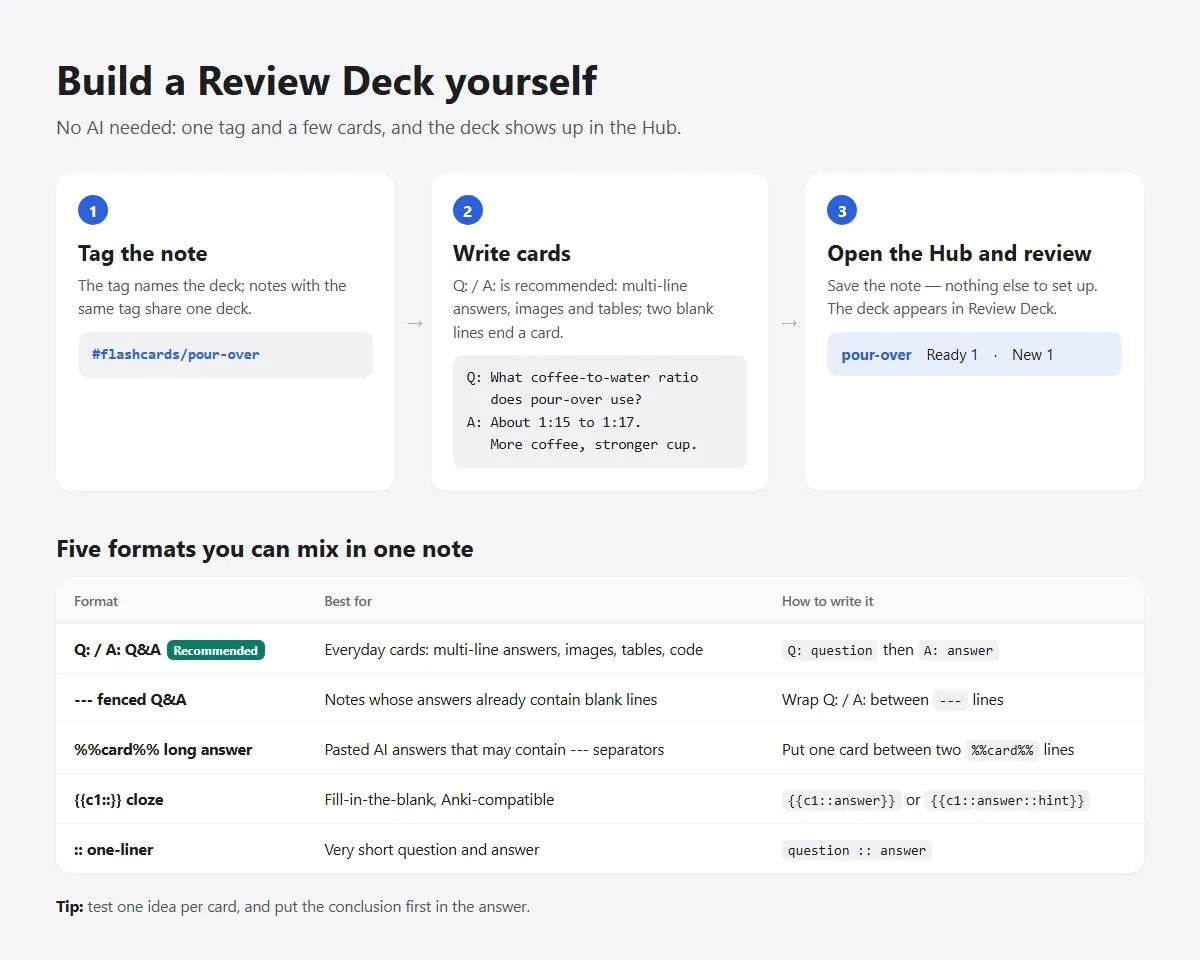
For anything you want to keep for months, write flashcards so a scheduler can bring them back. Most Obsidian flashcard plugins read cards from plain text in your notes. Here are two cards in EngramQuest's format; the :: one-liner also works in the Spaced Repetition plugin.[17][18]
Hand-written cards (EngramQuest format)
#flashcards/biology

Q: Why does a cell membrane let water through but block most ions?
A: Its lipid core repels charged particles. Small uncharged molecules
   cross it; ions need channels or pumps.


Osmosis :: Water moving across a membrane toward the side with more dissolved soluteGood cards test one idea and make you produce the answer rather than recognise it. Put the conclusion first in the answer. Every format, with examples, is in Flashcard formats.
Step 4: How often should you review, and in what order?
Review by recalling, spread the sessions out, and mix topics. Each has strong evidence behind it.
- Recall, don't reread. In Roediger and Karpicke's study, students who restudied a passage did better on a test five minutes later, but students who had practised recall did better two days and one week later.[2]
- Space the sessions. A quantitative synthesis of distributed-practice studies found that spaced study beat massed study for verbal recall, and that the best gap depends on how long you need to remember.[7]
- Mix topics. When people learned artists' painting styles, interleaving the artists helped them classify new paintings better than studying one artist at a time, even though most of them believed the blocked order had worked better.[9]
A worked spacing calculation
Cepeda and colleagues taught facts to more than 1,350 people with different gaps and test delays. The best gap grew as the test delay grew, but shrank as a share of it. For a test one week away, the best gap between the first and second session was about 20 to 40% of the delay.[8]
| Quantity | Value |
|---|---|
| Time until the test | 7 days |
| 20% of the delay | 1.4 days |
| 40% of the delay | 2.8 days |
| Second session | Day 2 or 3 after the first, not the night before the test |
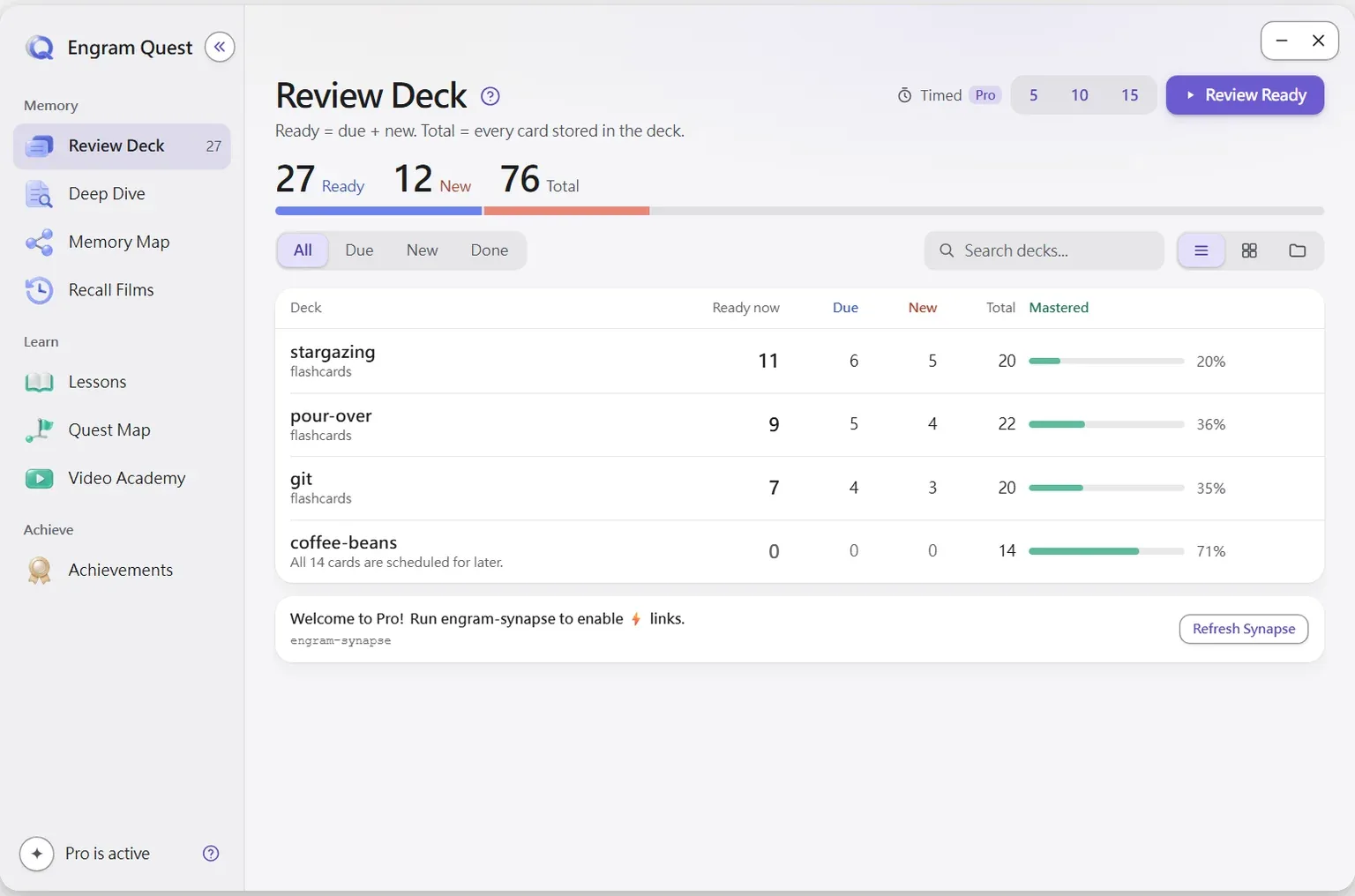
Beyond a week the ratio falls, so a fixed percentage stops working. That is the job of a scheduler. FSRS, which builds on Ye, Su and Cao's work on optimising review schedules, sets each card's next date from your own answer history.[11] EngramQuest's Review Deck schedules with FSRS-5, and the Spaced Repetition plugin offers FSRS or SM-2.[17][18]
For a test seven days away, Cepeda et al.'s finding that the best gap is about 20 to 40% of the delay puts your second study session 1.4 to 2.8 days after the first: day 2 or 3, not the night before.[8]
Step 5: How do you practise using what you learned?
Solve a problem with the idea in a situation that differs from where you learned it. Recall brings an idea back; transfer is using it somewhere new. Barnett and Ceci's review lists how far apart learning and use can be, in knowledge domain, physical setting, time, purpose, social setting and format, and shows why transfer across large gaps is hard to find.[10]
- Without AI: keep one project note per topic with a real task (fix a bug, cook the recipe, explain the idea to a friend). Write what you did, what failed and which notes you needed, and link it from the topic's MOC.
- Make your own variants: change one detail of a worked example (the numbers, the setting, a constraint) and solve it without looking.
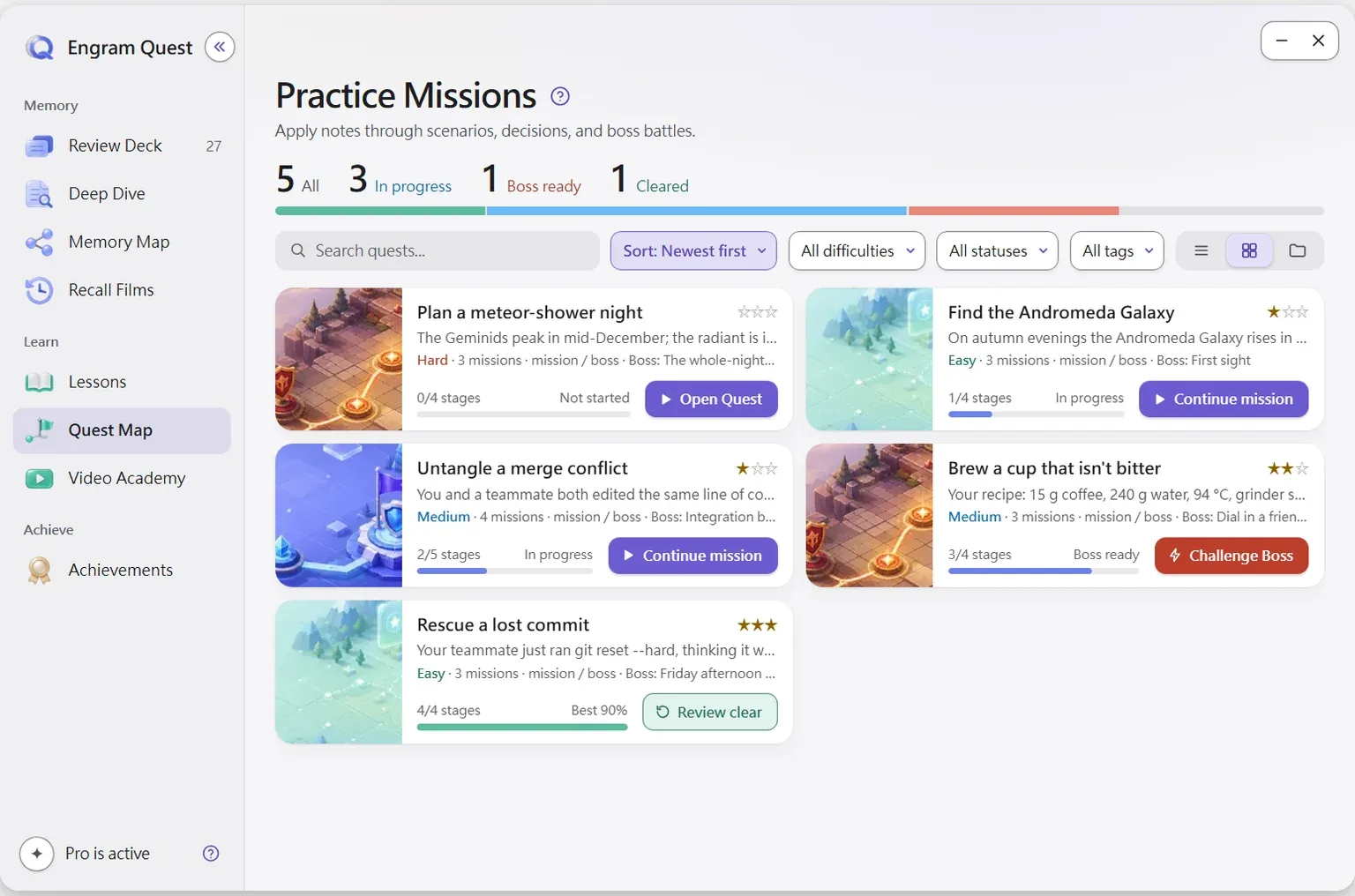
- With AI, if you want it: EngramQuest's Quest Map turns a note or topic into practice missions, each a situation you have not seen, with a Boss Battle at the end that tests judgment, sequencing, tradeoffs or diagnosis. Scores are stored apart from the quest.[17]
Step 6: How do you review a month of notes?
Once a month, list the notes you touched and try to recall each topic before you open it. It is one more retrieval session at a long gap, and it shows which topics never got cues.
The Dataview plugin can build the list. This query shows notes changed in the last 30 days, newest first:[20]
Dataview query for a monthly review
```dataview
TABLE file.mtime AS "Last changed"
WHERE file.mtime >= date(today) - dur(30 days)
SORT file.mtime DESC
```Without community plugins, the core Bases plugin shows notes as a table you can filter and sort by their properties.[16] Then work through three steps:
- For each topic, write two or three sentences from memory, without opening the notes.
- Open the notes and mark what you missed or got wrong.
- Write a card for each miss. A topic with nothing left to recall is either done or not worth keeping; decide which.
EngramQuest's Recall Films apply the same idea to a period of reading: a recall pack of retrieval questions for each topic, and a short film for the topics worth it. Watching films is free; making new ones is part of the optional upgrade inside the plugin.[17]
Which Obsidian plugins are best for studying?
Start with core plugins, which ship with Obsidian and cover most of the loop; add a community plugin only for the step it clearly improves. The list is short on purpose.
| Plugin | Type | Step | What it is for |
|---|---|---|---|
| Templates | Core | 1 Capture | Insert a study-note template with variables such as {{title}}[13] |
| Daily notes | Core | 1 Capture | A note for today's date, useful as an inbox for ideas you have not processed |
| Backlinks | Core | 2 Connect | See every note that links to the one you are reading |
| Canvas | Core | 2 Connect | Lay out and connect notes on a 2D board, saved as open JSON Canvas files[15] |
| Bases | Core | 6 Review | Table or card views of notes, filtered and sorted by their properties[16] |
| Spaced Repetition | Community | 3–4 Cue, practise | Flashcards and whole-note review inside Obsidian, scheduled with FSRS or SM-2; one-line, multi-line and cloze cards[18] |
| Excalidraw | Community | 2 Connect | Sketch diagrams in the vault, embed them in notes and link them to other notes[19] |
| Dataview | Community | 6 Review | Query your vault like a database using frontmatter and inline fields[20] |
| EngramQuest (this site's plugin) | Community | 3–6 | Review Deck with FSRS-5 and step-by-step hints, Quest Map practice and Memory Maps; free to install and use, with optional AI-built courses and videos through tools such as Claude Code[17] |
Use one flashcard plugin, not two; two schedulers for the same cards will disagree about when to show them. For a closer comparison, see Best Obsidian flashcard plugins and EngramQuest vs Obsidian Spaced Repetition. EngramQuest is made by powen, who also runs this site.
Where does AI fit into studying with Obsidian?
AI helps with the slow, mechanical parts (drafting questions from a long note, turning a course into cards, inventing practice scenarios) and hurts when it does the thinking the exercise was meant to make you do. In a field experiment with nearly a thousand high school maths students, unrestricted GPT-4 access during practice raised practice grades by 48%, but once access was removed those students scored 17% lower than peers who never had it. A version with tutoring guardrails largely avoided the drop.[12]
- Let AI write cues, never your answers. Check every AI-made card against your own note.
- Recall before you ask. Try the question first, then ask for an explanation of what you missed.
- Keep AI output apart from your notes, so you always know which words are yours.
EngramQuest is built along those lines: the plugin itself never calls an AI, AI-made cards go to engram-review/ai-cards/ instead of into your notes, and Review Deck works fully with hand-written cards.[17] If you use Claude Code, a sentence such as Make a Review Deck from my notes on photography produces a deck. Setup is on the Claude Code page and in Obsidian + Claude Code; a full AI-assisted walk-through is in How to learn with AI in Obsidian.
AI should write retrieval cues, not your answers: in a PNAS field experiment, unrestricted GPT-4 access raised practice grades by 48% but left students 17% worse once it was taken away.[12]
What does a week of studying with Obsidian look like?
Here is the loop for one topic with a test the following Monday. It needs no AI; every action uses the features above.
| Day | What you do in Obsidian |
|---|---|
| Monday | Lecture or reading. Capture 3 to 5 notes from the template and link each one to the topic's MOC. |
| Tuesday | Write questions for yesterday's notes; turn the important ones into flashcards. |
| Wednesday | First review from memory: day 2, inside the 20 to 40% window for a one-week test.[8] |
| Thursday | Redraw Monday's map from memory on a blank Canvas; add cards for the gaps. |
| Friday | Apply: one project task, a variant of a worked example, or a practice mission. |
| Weekend | Due cards only, with decks mixed. |
| End of month | Monthly recall: list the month's notes, recall, check, add cards for the misses. |
If you use EngramQuest, the guide sets up the Hub in three steps, and the science page explains the research behind each feature.
Frequently asked questions
Is Obsidian good for studying?
Yes, if you add retrieval and spacing to note-taking. Obsidian is strong at capturing and linking ideas; pair it with questions and a flashcard scheduler so you practise recalling what you wrote.
What are the best Obsidian plugins for students?
Start with the core plugins Templates, Daily notes, Backlinks, Canvas and Bases. Add one flashcard plugin, such as Spaced Repetition or EngramQuest, and Excalidraw or Dataview only if you need diagrams or review lists.
Can I study with Obsidian without AI?
Yes. Every step in this method works with core features and hand-written cards. In EngramQuest, tag a note #flashcards/topic and write Q: / A: cards, and they appear in Review Deck.
How often should I review my Obsidian flashcards?
Let a scheduler such as FSRS decide for each card. For a single test a week away, research suggests a second session about 2 to 3 days after the first rather than the night before.
Are concept maps and Canvas boards a waste of time?
No. Studying with maps is linked to better retention, but recalling from memory produced more learning than studying with a concept map, so redraw your map from memory as a test.
Sources
Every research claim in this article links to one of these sources. Preprints are marked as such.
- Dunlosky, J., Rawson, K. A., Marsh, E. J., Nathan, M. J., & Willingham, D. T. (2013). Improving students' learning with effective learning techniques: Promising directions from cognitive and educational psychology. Psychological Science in the Public Interest, 14(1), 4–58. doi.org/10.1177/1529100612453266
- Roediger, H. L., & Karpicke, J. D. (2006). Test-enhanced learning: Taking memory tests improves long-term retention. Psychological Science, 17(3), 249–255. doi.org/10.1111/j.1467-9280.2006.01693.x
- Karpicke, J. D., & Blunt, J. R. (2011). Retrieval practice produces more learning than elaborative studying with concept mapping. Science, 331(6018), 772–775. doi.org/10.1126/science.1199327
- Nesbit, J. C., & Adesope, O. O. (2006). Learning with concept and knowledge maps: A meta-analysis. Review of Educational Research, 76(3), 413–448. doi.org/10.3102/00346543076003413
- Slamecka, N. J., & Graf, P. (1978). The generation effect: Delineation of a phenomenon. Journal of Experimental Psychology: Human Learning and Memory, 4(6), 592–604. doi.org/10.1037/0278-7393.4.6.592
- Kornell, N., Hays, M. J., & Bjork, R. A. (2009). Unsuccessful retrieval attempts enhance subsequent learning. Journal of Experimental Psychology: Learning, Memory, and Cognition, 35(4), 989–998. doi.org/10.1037/a0015729
- Cepeda, N. J., Pashler, H., Vul, E., Wixted, J. T., & Rohrer, D. (2006). Distributed practice in verbal recall tasks: A review and quantitative synthesis. Psychological Bulletin, 132(3), 354–380. doi.org/10.1037/0033-2909.132.3.354
- Cepeda, N. J., Vul, E., Rohrer, D., Wixted, J. T., & Pashler, H. (2008). Spacing effects in learning: A temporal ridgeline of optimal retention. Psychological Science, 19(11), 1095–1102. doi.org/10.1111/j.1467-9280.2008.02209.x
- Kornell, N., & Bjork, R. A. (2008). Learning concepts and categories: Is spacing the "enemy of induction"? Psychological Science, 19(6), 585–592. doi.org/10.1111/j.1467-9280.2008.02127.x
- Barnett, S. M., & Ceci, S. J. (2002). When and where do we apply what we learn? A taxonomy for far transfer. Psychological Bulletin, 128(4), 612–637. doi.org/10.1037/0033-2909.128.4.612
- Ye, J., Su, J., & Cao, Y. (2022). A stochastic shortest path algorithm for optimizing spaced repetition scheduling. Proceedings of the 28th ACM SIGKDD Conference on Knowledge Discovery and Data Mining (KDD '22). The basis of the FSRS algorithm. doi.org/10.1145/3534678.3539081
- Bastani, H., Bastani, O., Sungu, A., Ge, H., Kabakcı, Ö., & Mariman, R. (2025). Generative AI without guardrails can harm learning: Evidence from high school mathematics. Proceedings of the National Academy of Sciences, 122(26), e2422633122. doi.org/10.1073/pnas.2422633122
- Obsidian (2026). Templates (core plugin). Obsidian Help. Checked 19 November 2026. obsidian.md/help/plugins/templates
- Obsidian (2026). Callouts. Obsidian Help. Checked 19 November 2026. obsidian.md/help/callouts
- Obsidian (2026). Canvas (core plugin). Obsidian Help. Checked 19 November 2026. obsidian.md/help/plugins/canvas
- Obsidian (2026). Introduction to Bases (core plugin). Obsidian Help. Checked 19 November 2026. obsidian.md/help/bases
- EngramQuest (2026). EngramQuest: README (v2.0.x). GitHub, bahfahh/engram-quest. Checked 19 November 2026. github.com/bahfahh/engram-quest
- Mwangi, S. (2026). Obsidian Spaced Repetition Plugin: README. GitHub, st3v3nmw/obsidian-spaced-repetition. Checked 19 November 2026. github.com/st3v3nmw/obsidian-spaced-repetition
- Zsolt Viczián (2026). Excalidraw for Obsidian: README. GitHub, zsviczian/obsidian-excalidraw-plugin. Checked 19 November 2026. github.com/zsviczian/obsidian-excalidraw-plugin
- blacksmithgu (2026). Obsidian Dataview: README and reference (literals, page metadata). GitHub, blacksmithgu/obsidian-dataview. Checked 19 November 2026. github.com/blacksmithgu/obsidian-dataview
About this article
powen is the creator and developer of EngramQuest, a free Obsidian plugin that turns notes into lessons, teaching videos, practice quests and FSRS flashcards. Articles here are researched and drafted with AI help; every study cited is checked against the original paper, and plugin details come from the plugin's own documentation and source code.
How EngramQuest uses memory science